页面加载中,请稍候
来源:开源Linux发布时间:2023-03-241407浏览
询问 AI
今天我想分享一个有趣的项目叫做 “K8s ChatGPT Bot[1]”。该项目的目的是为 K8s 集群部署一个 ChatGPT 机器人。我们可以询问 ChatGPT 帮助我们解决 Prometheus 的警报,可以得到简洁的答复,不再需要一人在黑暗中独自解决警报问题!
我们需要用到 Robusta[2],如果你还没有 Robusta,可以参考《K8s — Robusta, K8s Troubleshooting Platform[3]》搭建一个 Robusta 平台。
下图是 Robusta 平台如何工作的截图:
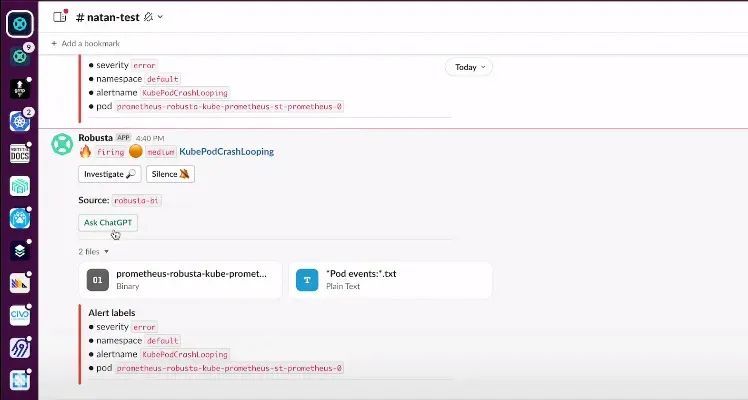
你可以在此处查看完整的演示视频:
https://www.loom.com/share/964cd8735a874287a9155c77320bdcdb
该机器人项目是基于 Robusta.dev[4] 实现的,Robusta.dev 是一个用于响应 K8s 警报的开源平台。其工作流程大致如下:
Prometheus 使用 Webhook 接收器将警报转发给 Robusta.dev 。
Robusta.dev 询问 ChatGPT 如何修复 Prometheus 警报。
Slack
Kubernetes集群
Python 3.7 及以上
生成 Robusta 配置文件
为 Robusta 准备 Python 虚拟环境。
$python3.10-mvenvrobusta
$sourcerobusta/bin/activate
(robusta)$pipinstall-Urobusta-cli--no-cache
Collectingrobusta-cli
Downloadingrobusta_cli-0.10.10-py3-none-any.whl(223kB)
━━━━━━━━━━━━━━━━━━━━━━━━━━━━━━━━━━━━━━━━223.8/223.8kB30.0MB/seta0:00:00
Collectingpymsteams<0.2.0,>=0.1.16
Downloadingpymsteams-0.1.16.tar.gz(7.6kB)
Preparingmetadata(setup.py)...done
...
SuccessfullyinstalledPyJWT-2.4.0appdirs-1.4.4autopep8-2.0.1black-21.5b2
cachetools-5.2.1certifi-2022.12.7cffi-1.15.1charset-normalizer-3.0.1
...
ruamel.yaml.clib-0.2.7six-1.16.0slack-sdk-3.19.5tenacity-8.1.0
toml-0.10.2tomli-2.0.1typer-0.4.2typing-extensions-4.4.0urllib3-1.26.14
watchgod-0.7webexteamssdk-1.6.1websocket-client-1.3.3
使用 robusta 生成一个配置文件:
$robustagen-config配置 Slack 集成
Robustareportsitsfindingstoexternaldestinations(wecallthem"sinks").
We'lldefinesomeofthemnow.
ConfigureSlackintegration?ThisisHIGHLYrecommended.[Y/n]:Y
Ifyourbrowserdoesnotautomaticallylaunch,openthebelowurl:
https://api.robusta.dev/integrations/slack?id=xxxx
使用浏览器打开网页:https://api.robusta.dev/integrations/slack?id=xxxx
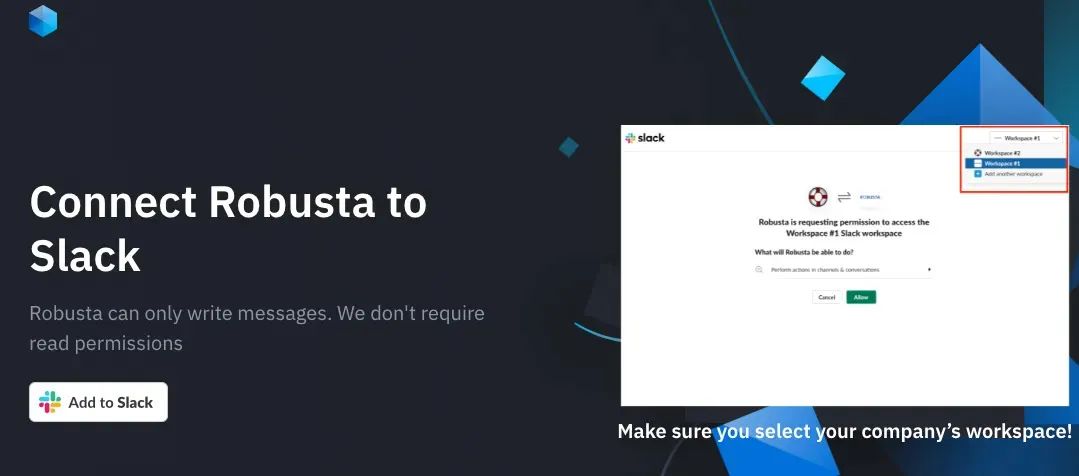
更新权限:
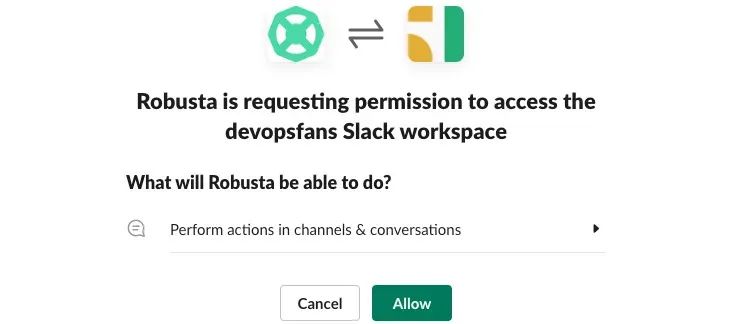
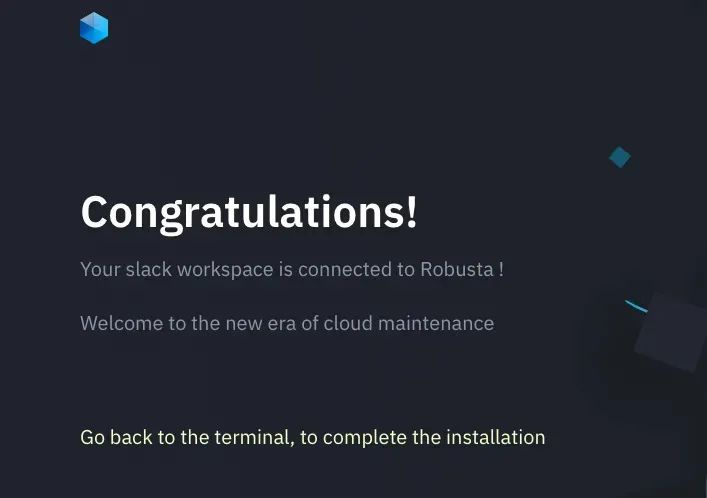
恭喜你配置 Slack 集成成功。
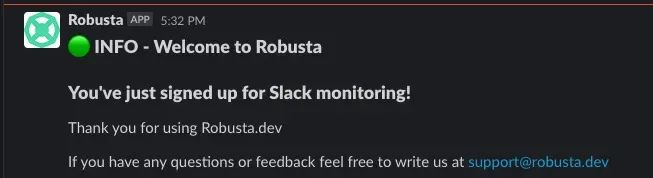
$robustagen-config在 slack channel 中,我们还可以看到:
Robustareportsitsfindingstoexternaldestinations(wecallthem"sinks").
We'lldefinesomeofthemnow.
ConfigureSlackintegration?ThisisHIGHLYrecommended.[Y/n]:Y
Ifyourbrowserdoesnotautomaticallylaunch,openthebelowurl:
https://api.robusta.dev/integrations/slack?id=xxxx
You'vejustconnectedRobustatotheSlackof:devopsfans
WhichslackchannelshouldIsendnotificationsto?#k8s-chatgpt-bot
ConfigureRobustaUIsink?ThisisHIGHLYrecommended.[Y/n]:Y
EnteryourGmail/Googleaddress.Thiswillbeusedtologin:xxx@gmail.com
Chooseyouraccountname(e.gyourorganizationname):devopsfans
Successfullyregistered.
RobustacanusePrometheusasanalertsource.
Ifyouhaven'tinstalledityet,Robustacaninstalla
pre-configuredPrometheus.
Wouldyouliketodoso?[y/N]:y
PleasereadandapproveourEndUserLicenseAgreement:
https://api.robusta.dev/eula.html
DoyouacceptourEndUserLicenseAgreement?[y/N]:y
Lastquestion!WouldyouliketohelpusimproveRobustabysendingexceptionreports?[y/N]:N
Savedconfigurationto./generated_values.yaml-savethisfileforfutureuse!
FinishinstallingwithHelm(seetheRobustadocs).
ThenlogintoRobustaUIathttps://platform.robusta.dev
Bytheway,we'llsendyousomemessageslatertogetfeedback.
(Wedon'tstoreyourAPIkey,sowescheduledfuturemessagesusingSlack's
API)
安装和更新 robusta 仓库。
$helmrepoaddrobustahttps://robusta-charts.storage.googleapis.comhelmrepoupdate更新 generated_values.yaml 文件
"robusta"hasbeenaddedtoyourrepositories
Hangtightwhilewegrabthelatestfromyourchartrepositories...
...Successfullygotanupdatefromthe"kedacore"chartrepository
...Successfullygotanupdatefromthe"robusta"chartrepository
...Successfullygotanupdatefromthe"grafana"chartrepository
...Successfullygotanupdatefromthe"prometheus-community"chartrepository
...Successfullygotanupdatefromthe"stable"chartrepository
UpdateComplete.⎈HappyHelming!⎈
使用以下内容更新 generated_values.yaml 文件:
playbookRepos:将Robusta 部署到 K8s
chatgpt_robusta_actions:
url:"https://github.com/robusta-dev/kubernetes-chatgpt-bot.git"
customPlaybooks:
#Addthe'AskChatGPT'buttontoallPrometheusalerts
-triggers:
-on_prometheus_alert:{}
actions:
-chat_gpt_enricher:{}
globalConfig:
chat_gpt_token:YOURKEYGOESHERE
$helminstallrobustarobusta/robusta-f./generated_values.yaml\验证两个 Robusta pod 正常运行且在日志中没有发现错误日志:
--setclusterName=dev-cluster
$kubectlgetpods-A|greprobusta
defaultalertmanager-robusta-kube-prometheus-st-alertmanager-02/2Running1(4m19sago)9m25s
defaultprometheus-robusta-kube-prometheus-st-prometheus-02/2Running09m25s
defaultrobusta-forwarder-6b7d8d9d88-2rv9d1/1Running09m29s
defaultrobusta-grafana-64944bfcdc-v97xh3/3Running09m29s
defaultrobusta-kube-prometheus-st-admission-patch-6zj4b0/1Completed09m28s
defaultrobusta-kube-prometheus-st-operator-7b985d7fb-c9f9t1/1Running09m29s
defaultrobusta-kube-state-metrics-688d794968-ll6gf1/1Running09m29s
defaultrobusta-prometheus-node-exporter-2k5f71/1Running05m24s
defaultrobusta-prometheus-node-exporter-zxsrg1/1Running09m29s
defaultrobusta-runner-5868b494d6-m62921/1Running09m29s

$robustalogs
settingupcoloredlogging
2023-01-1422:57:01.428INFOloggerinitializedusingINFOloglevel
2023-01-1422:57:01.429INFOCreatinghikarumonkeypatches
2023-01-1422:57:01.429INFOCreatingyamlmonkeypatch
2023-01-1422:57:01.429INFOCreatingkubernetesContainerImagemonkeypatch
2023-01-1422:57:01.430INFOwatchingdir/etc/robusta/playbooks/forcustomplaybookschanges
2023-01-1422:57:01.431INFOwatchingdir/etc/robusta/config/active_playbooks.yamlforcustomplaybookschanges
2023-01-1422:57:01.431INFOReloadingplaybookpackagesduetochangeoninitialization
2023-01-1422:57:01.431INFOloadingconfig/etc/robusta/config/active_playbooks.yaml
2023-01-1422:57:01.467INFONocustomplaybooksdefinedat/etc/robusta/playbooks/storage
2023-01-1422:57:01.468INFOCloninggitrepohttps://github.com/robusta-dev/kubernetes-chatgpt-bot.git.reponamekubernetes-chatgpt-bot
...
2023-01-1422:57:07.364INFOconnectingtoserverasaccount_id=8302df56-c554-4129-8b95-d143d1f2e3a2;cluster_name=dev-cluster
2023-01-1422:57:07.977INFOInitializingservicescache
2023-01-1422:57:08.203INFOInitializingnodescache
2023-01-1422:57:08.395INFOInitializingjobscache
2023-01-1422:57:08.603INFOGettingeventshistory
2023-01-1422:57:10.403INFOClusterhistoricaldatasent.
2023-01-1423:04:43.681INFOclusterstatus{'account_id':'8302df56-c554-4129-8b95-d143d1f2e3a2','cluster_id':'dev-cluster','version':'0.10.10','last_alert_at':'2023-01-1423:04:18.959377','light_actions':['related_pods','prometheus_enricher','add_silence','delete_pod','delete_silence','get_silences','logs_enricher','pod_events_enricher','deployment_events_enricher','job_events_enricher','job_pod_enricher','get_resource_yaml','node_cpu_enricher','node_disk_analyzer','node_running_pods_enricher','node_allocatable_resources_enricher','node_status_enricher','node_graph_enricher','oomkilled_container_graph_enricher','pod_oom_killer_enricher','oom_killer_enricher','volume_analysis','python_profiler','pod_ps','python_memory','debugger_stack_trace','python_process_inspector','prometheus_alert','create_pvc_snapshot'],'updated_at':'now()'}
现在,我们终于可以使用 Robusta 了!默认情况下,Robusta 在当 K8s Pod 崩溃时发送通知。
因此,让我们创建一个崩溃的 Pod:
$kubectlapply-fhttps://gist.githubusercontent.com/robusta-lab/283609047306dc1f05cf59806ade30b6/raw一旦 Pod 达到两次重启,在 Slack channel 我们就将收到有关 Pod 崩溃的消息,如下所示:
deployment.apps/crashpodcreated
$kubectlgetpods-A|grepcrash
defaultcrashpod-64db77b594-cgz4s0/1CrashLoopBackOff2(21sago)36s
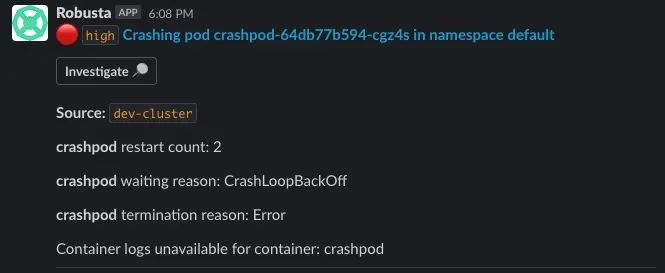
经过我们的实验,我们已经确认 Robusta 已与我们的 Slack 和 K8s 集群集成。接下来让我们与 ChatGPT 机器人进行交互!
立即触发 Prometheus 警报,跳过正常延迟:
$robustaplaybookstriggerprometheus_alertalert_name=KubePodCrashLoopingnamespace=defaultpod_name=example-pod现在切换到 Slack,我们将看到一个新警报,并且这次带有 “Ask ChatGPT” 的按钮!
======================================================================
Triggeringaction...
======================================================================
runningcmd:curl-XPOSThttp://localhost:5000/api/trigger-H'Content-Type:application/json'-d
'{"action_name":"prometheus_alert","action_params":
{"alert_name":"KubePodCrashLooping","namespace":"default",
"pod_name":"example-pod"}}'
{"success":true}
======================================================================
Fetchinglogs...
======================================================================
2023-01-1423:14:33.463INFOErrorloadingkubernetespoddefault/example-pod.reason:NotFoundstatus:404
2023-01-1423:14:33.481INFOErrorloadingkubernetespoddefault/example-pod.reason:NotFoundstatus:404
2023-01-1423:14:33.503INFOErrorloadingkubernetespoddefault/example-pod.reason:NotFoundstatus:404
2023-01-1423:14:33.505ERRORcannotrunpod_events_enricheronalertwithnopodobject:PrometheusKubernetesAlert(sink_findings=defaultdict(<class'list'>,{'main_slack_sink':[<robusta.core.reporting.base.Findingobjectat0x7fab53074e20>],'main_ms_teams_sink':[<robusta.core.reporting.base.Findingobjectat0x7fab53074700>],'robusta_ui_sink':[<robusta.core.reporting.base.Findingobjectat0x7fab40773a30>]}),named_sinks=['main_slack_sink','main_ms_teams_sink','robusta_ui_sink'],response={'success':True},stop_processing=False,_scheduler=<robusta.integrations.scheduled.playbook_scheduler_manager_impl.PlaybooksSchedulerManagerImplobjectat0x7fab4088e0a0>,_context=ExecutionContext(account_id='8302df56-c554-4129-8b95-d143d1f2e3a2',cluster_name='dev-cluster'),obj=None,alert=PrometheusAlert(endsAt=datetime.datetime(2023,1,14,23,14,33,430401),generatorURL='',startsAt=datetime.datetime(2023,1,14,23,14,33,430406),fingerprint='',status='firing',labels={'severity':'error','namespace':'default','alertname':'KubePodCrashLooping','pod':'example-pod'},annotations={}),alert_name='KubePodCrashLooping',alert_severity='error',label_namespace='default',node=None,pod=None,deployment=None,job=None,daemonset=None,statefulset=None)
2023-01-1423:14:33.524INFOErrorloadingkubernetespoddefault/example-pod.reason:NotFoundstatus:404
2023-01-1423:14:33.696ERRORCallbackBlocknotsupportedformsteams
2023-01-1423:14:33.697ERRORerrorsendingmessagetomsteams
e=InvalidURL'False':Noschemasupplied.Perhapsyoumeanthttp://False?
======================================================================
Done!
======================================================================
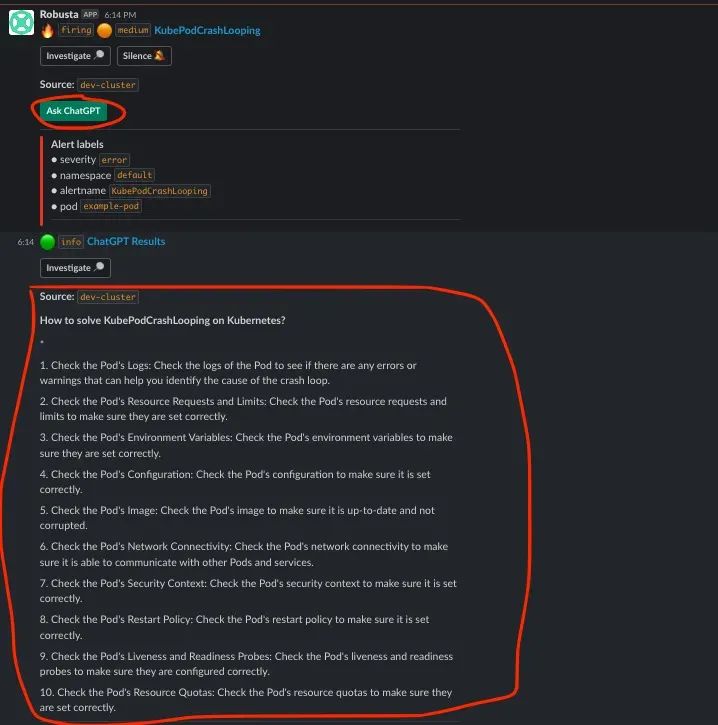
示例 2:节点容量为 100%
下面是一个节点达到 100% 容量的例子:
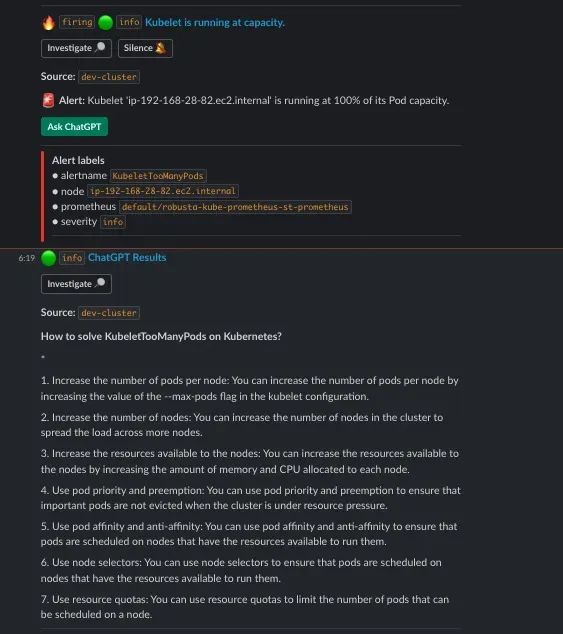
Robusta 有一个用于集成的 UI,也有一个预配置的 Promethus 系统,如果你还没有自己的 K8s 集群,并且想尝试一下这个 ChatGPT 机器人,你可以使用 Robusta 现有的!
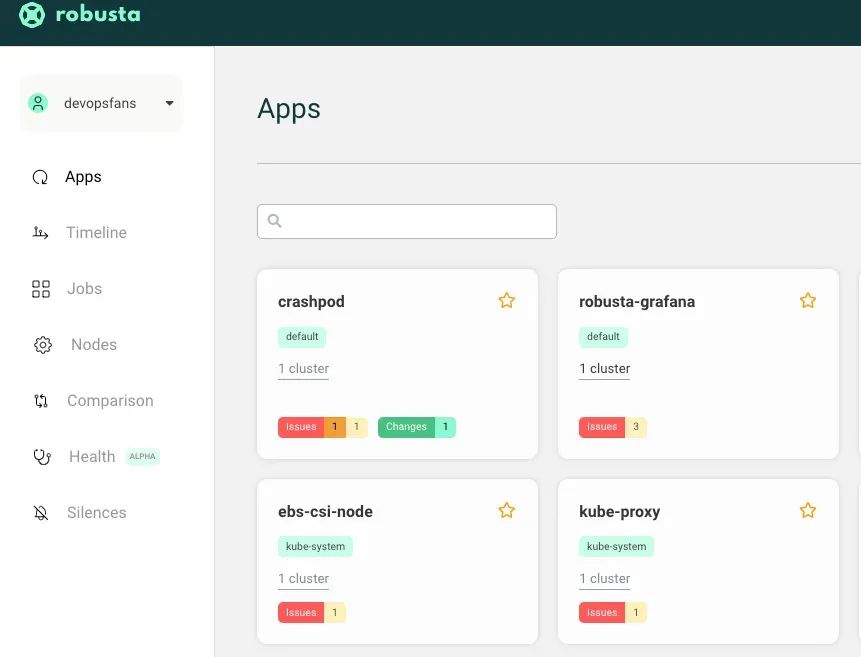
我们花了一些时间终于把 K8s + ChatGPT 平台搭建起来了。这是一个由爱好者们共同组建的项目,并且此项目具有很大的潜力。我希望你喜欢这篇文章。
如果你还没有自己的 K8s 集群和 Prometheus 监控系统,你可以使用 Robusta 预配置的 Promethus 监控系统。
相关链接:
https://github.com/robusta-dev/kubernetes-chatgpt-bot
https://home.robusta.dev/
https://medium.com/dev-genius/k8s-robusta-k8s-troubleshooting-platform-efd389b47f24
10T 技术资源大放送!包括但不限于:Linux、虚拟化、容器、云计算、网络、Python、Go 等。在开源Linux公众号内回复10T,即可免费获取!
新闻来源:开源Linux,文中所述为作者独立观点,不代表icspec立场。更多精彩资讯请下载icspec App。如对本稿件有异议,请联系微信客服specltkj。
暂无评论哦,快来评论一下吧!
2026-06-15

2026-06-22
2026-06-22