
页面加载中,请稍候
来源:嵌入式Linux系统开发发布时间:2023-06-302045浏览
询问 AI涉及的程序如下图所示:
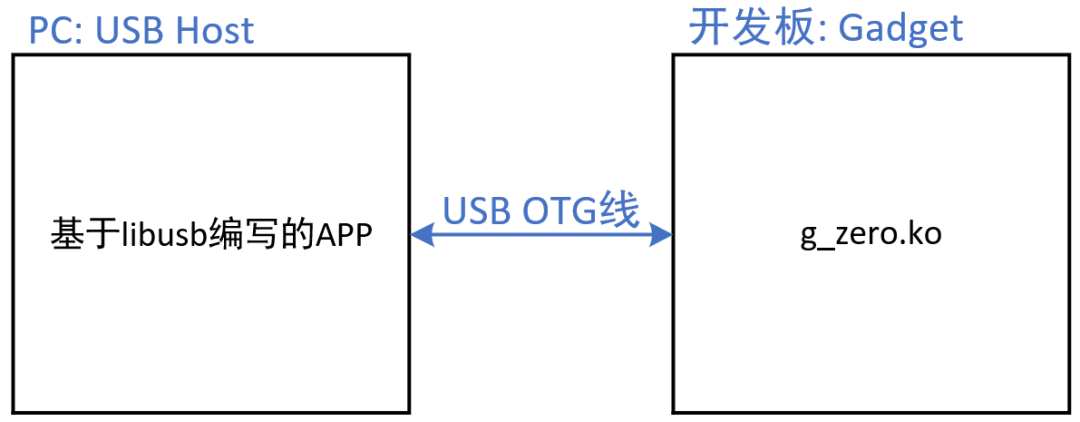
PC 端基于 libusb 编写应用程序,开发板端直接使用 Linux 自带的 USB Gadget 驱动 zero.c【/drivers/usb/gadget/legacy/zero.c】。
应用程序编程框架如下:
在 Ubuntu 里执行如下命令,根据 VID:PID 获取设备信息:
$lsusb-v-d0525:a4a0
可以列出 zero 设备的描述符:
Bus001Device002:ID0525:a4a0NetchipTechnology,Inc.Linux-USB"GadgetZero"
Couldn'topendevice,someinformationwillbemissing
DeviceDescriptor:
bLength18
bDescriptorType1
bcdUSB2.00
bDeviceClass255VendorSpecificClass
bDeviceSubClass0
bDeviceProtocol0
bMaxPacketSize064
idVendor0x0525NetchipTechnology,Inc.
idProduct0xa4a0Linux-USB"GadgetZero"
bcdDevice4.09
iManufacturer1
iProduct2
iSerial3
bNumConfigurations2
ConfigurationDescriptor:
bLength9
bDescriptorType2
wTotalLength69
bNumInterfaces1
bConfigurationValue3
iConfiguration4
bmAttributes0xc0
SelfPowered
MaxPower2mA
InterfaceDescriptor:
bLength9
bDescriptorType4
bInterfaceNumber0
bAlternateSetting0
bNumEndpoints2
bInterfaceClass255VendorSpecificClass
bInterfaceSubClass0
bInterfaceProtocol0
iInterface0
EndpointDescriptor:
bLength7
bDescriptorType5
bEndpointAddress0x81EP1IN
bmAttributes2
TransferTypeBulk
SynchTypeNone
UsageTypeData
wMaxPacketSize0x02001x512bytes
bInterval0
EndpointDescriptor:
bLength7
bDescriptorType5
bEndpointAddress0x01EP1OUT
bmAttributes2
TransferTypeBulk
SynchTypeNone
UsageTypeData
wMaxPacketSize0x02001x512bytes
bInterval0
InterfaceDescriptor:
bLength9
bDescriptorType4
bInterfaceNumber0
bAlternateSetting1
bNumEndpoints4
bInterfaceClass255VendorSpecificClass
bInterfaceSubClass0
bInterfaceProtocol0
iInterface0
EndpointDescriptor:
bLength7
bDescriptorType5
bEndpointAddress0x81EP1IN
bmAttributes2
TransferTypeBulk
SynchTypeNone
UsageTypeData
wMaxPacketSize0x02001x512bytes
bInterval0
EndpointDescriptor:
bLength7
bDescriptorType5
bEndpointAddress0x01EP1OUT
bmAttributes2
TransferTypeBulk
SynchTypeNone
UsageTypeData
wMaxPacketSize0x02001x512bytes
bInterval0
EndpointDescriptor:
bLength7
bDescriptorType5
bEndpointAddress0x82EP2IN
bmAttributes1
TransferTypeIsochronous
SynchTypeNone
UsageTypeData
wMaxPacketSize0x04001x1024bytes
bInterval4
EndpointDescriptor:
bLength7
bDescriptorType5
bEndpointAddress0x02EP2OUT
bmAttributes1
TransferTypeIsochronous
SynchTypeNone
UsageTypeData
wMaxPacketSize0x04001x1024bytes
bInterval4
ConfigurationDescriptor:
bLength9
bDescriptorType2
wTotalLength32
bNumInterfaces1
bConfigurationValue2
iConfiguration5
bmAttributes0xc0
SelfPowered
MaxPower2mA
InterfaceDescriptor:
bLength9
bDescriptorType4
bInterfaceNumber0
bAlternateSetting0
bNumEndpoints2
bInterfaceClass255VendorSpecificClass
bInterfaceSubClass0
bInterfaceProtocol0
iInterface6
EndpointDescriptor:
bLength7
bDescriptorType5
bEndpointAddress0x81EP1IN
bmAttributes2
TransferTypeBulk
SynchTypeNone
UsageTypeData
wMaxPacketSize0x02001x512bytes
bInterval0
EndpointDescriptor:
bLength7
bDescriptorType5
bEndpointAddress0x01EP1OUT
bmAttributes2
TransferTypeBulk
SynchTypeNone
UsageTypeData
wMaxPacketSize0x02001x512bytes
bInterval0
它有 2 个配置:
参考 libusb 示例:libusb\examples\xusb.c
#include<errno.h>
#include<signal.h>
#include<stdio.h>
#include<stdlib.h>
#include<string.h>
#include<libusb-1.0/libusb.h>

#defineDRIVER_VENDOR_NUM0x0525/*NetChip*/
#defineDRIVER_PRODUCT_NUM0xa4a0/*Linux-USB"GadgetZero"*/

intget_bulk_endpoint(libusb_device*dev,int*in_ep,int*out_ep,int*in_ep_maxlen)
{
structlibusb_config_descriptor*config;
conststructlibusb_endpoint_descriptor*ep;
intr;
   intiface_idx;
intfound=0;

r=libusb_get_active_config_descriptor(dev,config);
if(r<0){
printf("couldnotretrieveactiveconfigdescriptor");
returnLIBUSB_ERROR_OTHER;
}

{
conststructlibusb_interface*iface=config->interface[0];
intaltsetting_idx=0;

conststructlibusb_interface_descriptor*altsetting
=iface->altsetting[altsetting_idx];
intep_idx;

for(ep_idx=0;ep_idx<altsetting->bNumEndpoints;ep_idx++){
conststructlibusb_endpoint_descriptor*ep= altsetting->endpoint[ep_idx];

if((ep->bmAttributesLIBUSB_TRANSFER_TYPE_MASK)==LIBUSB_TRANSFER_TYPE_BULK)
{
if(ep->bEndpointAddressLIBUSB_ENDPOINT_IN)
{
*in_ep=ep->bEndpointAddress;
*in_ep_maxlen=ep->wMaxPacketSize;
 found++;
}
else
{
*out_ep=ep->bEndpointAddress;
found++;
}
}
}
}

libusb_free_config_descriptor(config);
return(found==2)?0:-1;
}

voidPrintUsage(char*name)
{
printf("Usage:\n");
printf("%s-l:listbConfigurationValueofallconfigs\n",name);
printf("%s-s<bConfigurationValue>:selectconfig\n",name);
printf("%s-wstr<string>:writestring\n",name);
printf("%s-rstr:readstring\n",name);
printf("%s-w<val1val2....>:writebytes\n",name);
printf("%s-r:read32bytes\n",name);
}

intmain(intargc,char**argv)
{
interr=0;
libusb_device*dev,**devs;
intnum_devices;
intendpoint;
intinterface_num=0;
intfound=0;
inttransferred;
intcount=0;
unsignedcharbuffer[1024];
structlibusb_config_descriptor*config_desc;
structlibusb_device_handle*dev_handle=NULL;
inti;
intin_ep,out_ep;
intin_ep_maxlen;

if(argc==1)
{
PrintUsage(argv[0]);
return0;
}

/*libusb_init*/
err=libusb_init(NULL);
if(err<0){
fprintf(stderr,"failedtoinitialiselibusb%d-%s\n",err,libusb_strerror(err));
exit(1);
}

/*opendevice*/
dev_handle=libusb_open_device_with_vid_pid(NULL,DRIVER_VENDOR_NUM,DRIVER_PRODUCT_NUM);
   if(!dev_handle){
       printf("cannotopenzerodevice\n");
  return-1;
}

dev=libusb_get_device(dev_handle);
/*想选择某一个配置,先知道它的bConfigurationValue*/
if(!strcmp(argv[1],"-l"))
{
for(i=0;i<255;i++)
{
/*parseinterfacedescriptor,findusbmouse*/
err=libusb_get_config_descriptor(dev,i,config_desc);
if(err){
//fprintf(stderr,"couldnotgetconfigurationdescriptor\n");
break;
}
printf("config%d:bConfigurationValue=%d\n",i,config_desc->bConfigurationValue);
libusb_free_config_descriptor(config_desc);
}
return0;
}

/*想选择某一个配置*/
if(!strcmp(argv[1],"-s")(argc==3))
{
i=strtoul(argv[2],NULL,0);
libusb_set_auto_detach_kernel_driver(dev_handle,0);
libusb_detach_kernel_driver(dev_handle,0);
//libusb_release_interface(dev_handle,0);
err=libusb_set_configuration(dev_handle,i);
if(err){
fprintf(stderr,"couldnotsetconfigurationas%d,err=%d\n",i,err);
return-1;
}
return0;
}

err=libusb_get_configuration(dev_handle,i);
fprintf(stdout,"currentconfig:%d\n",i);

/*想读写数据需要得到 endpoint*/
err=get_bulk_endpoint(dev,in_ep,out_ep,in_ep_maxlen);
if(err){
fprintf(stderr,"couldnotgetbulkendpoints\n");
gotoexit;
}
fprintf(stdout,"in_ep=0x%x,out_ep=0x%x\n",in_ep,out_ep);

/*claiminterface*/
libusb_set_auto_detach_kernel_driver(dev_handle,1);
err=libusb_claim_interface(dev_handle,interface_num);
if(err)
{
fprintf(stderr,"failedtolibusb_claim_interface\n");
gotoexit;
}

/*writestring*/
if(!strcmp(argv[1],"-wstr")(argc==3))
{
memset(buffer,0,32);
strncpy(buffer,argv[2],32);
   err=libusb_bulk_transfer(dev_handle,out_ep,
buffer,32,transferred,1000);
if(err){
fprintf(stderr,"libusb_bulk_transfererr=%d\n",err);
gotoexit;
}
if(transferred!=32)
{
fprintf(stderr,"transferred!=32\n");
}
gotoexit;
}

/*readstring*/
if(!strcmp(argv[1],"-rstr"))
{
memset(buffer,0,32);
   err=libusb_bulk_transfer(dev_handle,in_ep,
buffer,32,transferred,1000);
if(err){
fprintf(stderr,"libusb_bulk_transfererr=%d\n",err);
gotoexit;
}
if(transferred!=32)
{
fprintf(stderr,"transferred!=32\n");
}
printf("Readstring:%s\n",buffer);
gotoexit;
}

/*writedatas*/
if(!strcmp(argv[1],"-w")(argc>=3))
{
memset(buffer,0,32);
/*argv[2],...*/
for(i=2;i<argc;i++)
buffer[i-2]=strtoul(argv[i],NULL,0);

   err=libusb_bulk_transfer(dev_handle,out_ep,
buffer,argc-2,transferred,1000);
if(err){
fprintf(stderr,"libusb_bulk_transfererr=%d\n",err);
gotoexit;
}
if(transferred!=argc-2)
{
fprintf(stderr,"transferred!=%d\n",argc-2);
}
gotoexit;
}

/*readdatas*/
if(!strcmp(argv[1],"-r"))/*读Source/Sink这个配置里的端点时,它一次性返回512字节的数据*/
{
memset(buffer,0,1024);
   err=libusb_bulk_transfer(dev_handle,in_ep,
buffer,in_ep_maxlen,transferred,1000);
if(err){
fprintf(stderr,"libusb_bulk_transfererr=%d\n",err);
gotoexit;
}
if(transferred!=in_ep_maxlen)
{
fprintf(stderr,"transferred!=in_ep_maxlen\n");
}
printf("Readdatas:\n");
for(i=0;i<transferred;i++)
{
printf("%02x",buffer[i]);
if((i+1)%16==0)
printf("\n");
}
printf("\n");

gotoexit;
}

exit:
/*libusb_close*/
libusb_release_interface(dev_handle,interface_num);
libusb_close(dev_handle);
libusb_exit(NULL);
returnerr;
}
实验步骤:
先安装 g_zero 驱动程序:在开发板上执行modprobe g_zero
然后连接 OTG 线到 PC
在 Ubuntu 中识别出设备
执行测试程序
apt-cachesearchlibusb             #查找 libusb 开发包
sudoaptinstalllibusb-1.0-0-dev   #安装 libusb 开发包
gcc-ozero_appzero_app.c-lusb-1.0#编译
$sudo./zero_app-l#列出设备的配置值
config0:bConfigurationValue=3
config1:bConfigurationValue=2

#测试loopback功能
$sudo./zero_app-s2#选择loopback的配置
$sudo./zero_app-wstrwww.100ask.net#写入字符串
currentconfig:2
in_ep=0x81,out_ep=0x1
$sudo./zero_app-rstr#读出字符串
currentconfig:2
in_ep=0x81,out_ep=0x1
Readstring:www.100ask.net

$sudo./zero_app-w12345678#写入8个字节
currentconfig:2
in_ep=0x81,out_ep=0x1
sudo./zero_app-r#读到8个字节
currentconfig:2
in_ep=0x81,out_ep=0x1
transferred!=in_ep_maxlen
Readdatas:
0102030405060708

#测试Source/Sink功能
$sudo./zero_app-s3#选择source/sink的配置
book@100ask:~/nfs_rootfs/05_libusb_zero$sudo./zero_app-r#读数据
currentconfig:3
in_ep=0x81,out_ep=0x1
Readdatas:
00000000000000000000000000000000
00000000000000000000000000000000
00000000000000000000000000000000
00000000000000000000000000000000

sudo./zero_app-w000#写数据,只能写入0,
#写入其他值将会导致开发板上的驱动认为是错误然后haltout端点
#然后只能重新执行”sudo./zero_app-s3“才能恢复
新闻来源:嵌入式Linux系统开发,文中所述为作者独立观点,不代表icspec立场。更多精彩资讯请下载icspec App。如对本稿件有异议,请联系微信客服specltkj。
暂无评论哦,快来评论一下吧!
2026-07-22
2026-06-08

2026-07-22