
页面加载中,请稍候
来源:嵌入式Linux系统开发发布时间:2023-06-173356浏览
询问 AI参考资料:
韦东山老师驱动大全

libusbGIT 仓库:https://github.com/libusb/libusb.git
libusb官网:https://libusb.info/
libusbAPI 接口:https://libusb.sourceforge.io/api-1.0/
libusb示例:https://github.com/libusb/libusb/tree/master/examples
libusb 是一个使用 C 编写的库,它提供 USB 设备的通用的访问方法。APP 通过它,可以方便地访问 USB 设备,无需编写 USB 设备驱动程序。
libusb 支持所有的传输类型(控制/批量/中断/实时),有两类 API 接口:同步(Synchronous,简单),异步(Asynchronous,复杂但是更强大)。
它是轻量级的、线程安全的。还支持热拔插。
可以通过 libusb 访问 USB 设备,不需要 USB 设备端的驱动程序,需要移除原来的驱动程序。然后就可以直接访问 USB 控制器的驱动程序,使用 open/read/write/ioctl/close 这些接口来打开设备、收发数据、关闭设备。
libusb 封装了更好用的函数,这些函数的使用可以分为 5 个步骤:
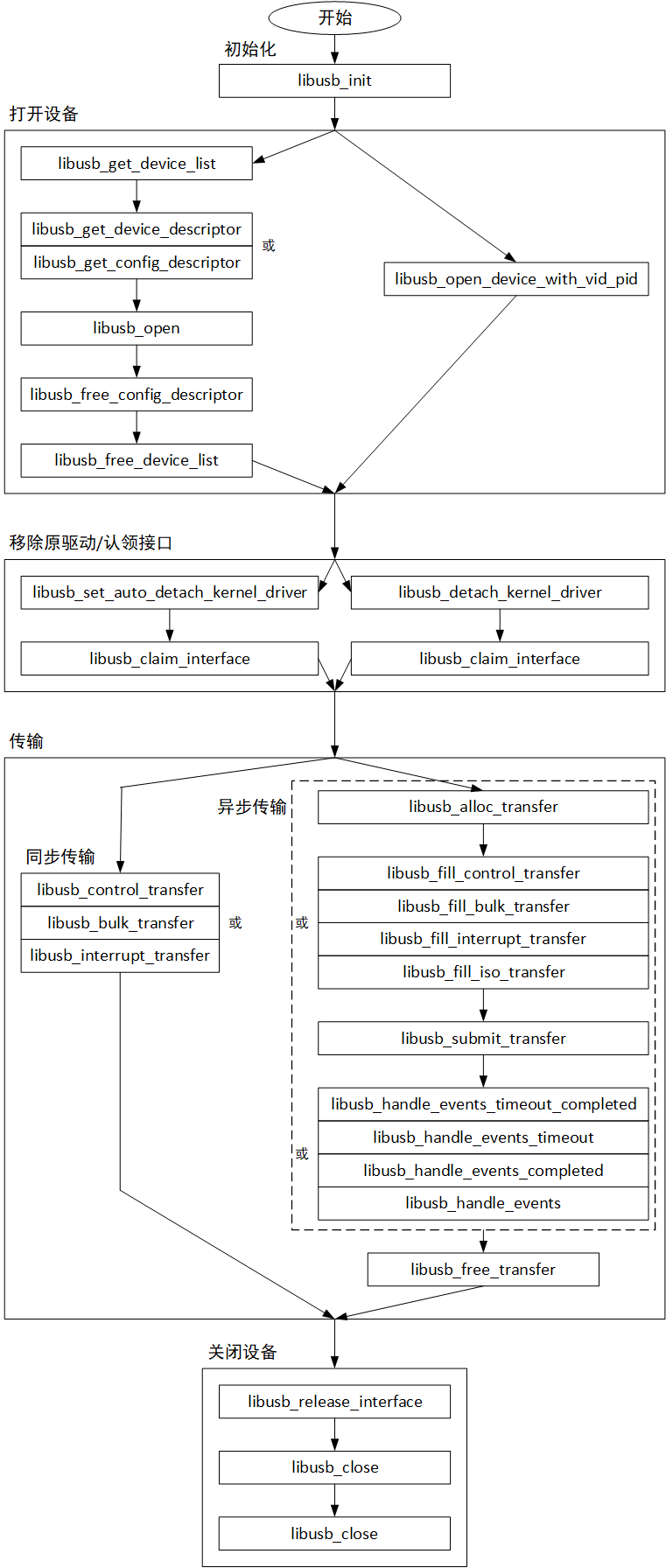
libusb 的接口函数分为两类:同步(Synchronous device I/O)、异步(Asynchronous device I/O)。
USB 数据传输分为两个步骤,对于读数据,先给设备发出数据的请求,一段时间后数据返回;对于写数据,先发送数据给设备,一段时间后得到回应。
同步接口的核心在于把上述两个步骤放在一个函数里面。比如想去读取一个 USB 键盘的数据,给键盘发出读请求后,如果用户一直没有按下键盘,那么读函数会一直等待。
异步接口的核心在于把上述两个步骤分开:使用一个非阻塞的函数启动传输,它会立刻返回;提供一个回调函数用来处理返回结果。
同步接口的示例代码如下,在libusb_bulk_transfer函数内部,如果没有数据则会休眠:
unsignedchardata[4];
intactual_length;
intr=libusb_bulk_transfer(dev_handle,LIBUSB_ENDPOINT_IN,data,sizeof(data),actual_length,0);
if(r==0actual_length==sizeof(data)){
//接收到的数据保存在data数组里
//解析这些数据就可以知道按键状态
}else{
error();
}
使用同步接口时,代码比较简单。但是无法实现"多 endpoint"的操作:上一个 endpoint 的传输在休眠,除非使用另一个线程,否则在同一个线程内部在等待期间是无法操作另一个 endpoint 的。还有另一个缺点:无法取消传输。
异步接口是在 libusb-1.0 引入的新性能,接口更复杂,但是功能更强大。在异步接口函数里,它启动传输、设置回调函数后就立刻返回。等"读到数据"或是"得到回应"后,回调函数被调用。发起数据传输的线程无需休眠等待结果,它支持"多endpoint"的操作,也支持取消传输。
/**\ingrouplibusb_lib
*初始化libusb,这个函数必须先于其他libusb的函数执行
*
*如果传入NULL,那么函数内部会穿件一个默认的context
*如果已经创建过默认的context,这个context会被重新使用(不会重新初始化它)
*
*参数:
*ctx:contextpointer的位置,也可以传入NULL
*返回值
*0-成功
*负数-失败
*/
intAPI_EXPORTEDlibusb_init(libusb_context**ctx);
初始化 libusb,参数是一个"a context pointer"的指针,如果这个参数为 NULL,则函数内部会创建一个"default context"。所谓"libusb context"就是 libusb 上下文,就是一个结构体,里面保存有各类信息,比如:libusb 的调试信息是否需要打印、各种互斥锁、各类链表(用来记录USB传输等等)。
程序退出前,调用如下函数:
/**\ingrouplibusb_lib
*发初始化libusb
*在关闭usb设备(libusb_close)后、退出程序前调用此函数
*
*参数:
*ctx:context,传入NULL表示defaultcontext
*/
voidAPI_EXPORTEDlibusb_exit(libusb_context*ctx);
可以使用libusb_get_device_list取出所有设备,函数接口如下:
/**@ingrouplibusb_dev
*返回一个list,list里含有当前系统中所有的USB设备
*
*我们一般会在list里寻找需要访问的设备,找到之后使用libusb_open函数打开它
*然后调用libusb_free_device_list释放list
*
*这个函数的返回值表示list中有多少个设备
*list的最后一项是NULL
*
*参数:
*ctx:context
*list:outputlocationforalistofdevices,最后必须调用libusb_free_device_list()来释放它
*返回值:list中设备的个数,或错误值
*/
ssize_tAPI_EXPORTEDlibusb_get_device_list(libusb_context*ctx,libusb_device***list);
调用此函数后,所有设备的信息存入 list,然后遍历 list,找到想操作的设备。这个函数内部会分配 list 的空间,所以用完后要释放掉,使用以下函数释放:
/**\ingrouplibusb_dev
*前面使用libusb_get_device_list()获得了设备list,
*使用完后要调用libusb_free_device_list()释放这个list
*如果参数unref_devices为1,则list中每个设备的引用计数值减小1
*参数:
*list:要释放的设备list
*unref_devices:是否要将设备的引用计数减1
*/
voidAPI_EXPORTEDlibusb_free_device_list(libusb_device**list,intunref_devices);
使用 libusb_get_device_list 得到设备列表后,可以选择里面的某个设备,然后调用 libusb_open:
/**\ingrouplibusb_dev
*打开一个设备并得到它的句柄,以后进行IO操作时都是使用句柄
*
*使用libusb_get_device()函数可以得到设备的list,
*从list里确定你要访问的设备后,使用libusb_open()去打开它。
*libusb_open()函数内部会增加此设备的引用计数,使用完毕后要调用libusb_close()减小引用计数。
*
*参数:
*dev:要打开的设备
*dev_handle:输出参数,用来保存句柄
*返回值:
*0-成功
*LIBUSB_ERROR_NO_MEM:缺少内存
*LIBUSB_ERROR_ACCESS:权限不足
*LIBUSB_ERROR_NO_DEVICE:这个设备未连接
*其他错误:其他LIBUSB_ERROR错误码
*/
intAPI_EXPORTEDlibusb_open(libusb_device*dev,libusb_device_handle**dev_handle);
使用 libusb_open 函数打开 USB 设备后,可以得到一个句柄:libusb_device_handle。以后调用各种数据传输函数时,就是使用libusb_device_handle。
使用完毕后,调用 libusb_close 关闭设备,函数原型如下:
/**\ingrouplibusb_dev
*关闭设备句柄,在程序退出之前应该使用它去关闭已经打开的句柄
*
*设备的引用计数在前面被libusb_open()函数增加了。
*在libusb_close()函数的内部,它会减小设备的引用计数。
*
*参数:dev_handle-句柄
*/
voidAPI_EXPORTEDlibusb_close(libusb_device_handle*dev_handle);
如果知道设备的 VID、PID,那么可以使用 libusb_open_device_with_vid_pid 来找到它、打开它。这个函数的内部,先使用libusb_get_device_list列出所有设备,然后遍历它们根据 ID 选出设备,接着调用 libusb_open 打开它,最后调用 libusb_free_device_list 释放设备。
libusb_open_device_with_vid_pid 函数原型如下:
/**\ingrouplibusb_dev
*打开设备的常规做法是使用libusb_get_device_list()得到设备list,
*然后遍历list,找到设备
*接着使用libusb_open()函数得到句柄
*
*如果知道USB设备的VID、PID,那么可以使用libusb_open_device_with_vid_pid()函数快速打开它,得到句柄。
*
*这个函数有一个缺点:如果系统中有多个ID相同的设备,你只能打开第1个设备
*
*参数:
*ctx:context,或者传入NULL以使用默认的context
*vendor_id:厂家ID
*product_id:产品ID
*
*返回值:
*句柄-找到的第1个设备的句柄
*NULL-没有找到设备
*/
DEFAULT_VISIBILITY
libusb_device_handle*LIBUSB_CALLlibusb_open_device_with_vid_pid(
libusb_context*ctx,uint16_tvendor_id,uint16_tproduct_id);
/**\ingrouplibusb_desc2.6.2 获得/释放配置描述符
*获得设备描述符
*
*参数:
*dev-哪个设备
*desc-输出参数,用来保存设备描述符
*
*返回值:
*0-成功,或其他LIBUSB_ERROR错误码
*/
intAPI_EXPORTEDlibusb_get_device_descriptor(libusb_device*dev,
structlibusb_device_descriptor*desc);
/**\ingrouplibusb_desc
*获得指定的配置描述符
*
*参数:
*dev-哪个设备
*config_index-哪个配置
*config-输出参数,用来保存配置描述符,使用完毕要调用libusb_free_config_descriptor()释放掉
*
*返回值:
*0-成功
*LIBUSB_ERROR_NOT_FOUND-没有这个配置
*其他LIBUSB_ERROR错误码
*/
intAPI_EXPORTEDlibusb_get_config_descriptor(libusb_device*dev,
uint8_tconfig_index,structlibusb_config_descriptor**config);

/**\ingrouplibusb_desc
*Freeaconfigurationdescriptorobtainedfrom
*前面使用libusb_get_active_config_descriptor()或libusb_get_config_descriptor()获得配置描述符,
*用完后调用libusb_free_config_descriptor()释放掉
*/
voidAPI_EXPORTEDlibusb_free_config_descriptor(
structlibusb_config_descriptor*config);
使用 libusb 访问 USB 设备时,需要先移除(detach)设备原来的驱动程序,然后认领接口(claim interface)。有两种办法:
方法1:
//只是设置一个标记位表示libusb_claim_interface
//使用libusb_claim_interface时会detach原来的驱动
libusb_set_auto_detach_kernel_driver(hdev,1);

//标记这个interface已经被使用认领了
libusb_claim_interface(hdev,interface_number);
方法2:
//detach原来的驱动
libusb_detach_kernel_driver(hdev,interface_number);

//标记这个interface已经被使用认领了
libusb_claim_interface(hdev,interface_number);
函数libusb_detach_kernel_driver原型如下:
/**\ingrouplibusb_dev
*给USB设备的接口(interface)移除驱动程序.Ifsuccessful,youwillthenbe
*移除原来的驱动后才能"claimtheinterface"、执行IO操作
*
*实际上libusb会给这个接口安装一个特殊的内核驱动,
*所以本函数"移除驱动"是移除其他驱动,不是移除这个特殊的驱动。
*若干这个接口已经安装了这个特殊的驱动,本函数会返回LIBUSB_ERROR_NOT_FOUND.
*
*参数:
*dev_handle-设备句柄
*interface_number-哪一个接口
*
*返回值:
*0-成功
*LIBUSB_ERROR_NOT_FOUND-这个接口没有安装其他驱动
*LIBUSB_ERROR_INVALID_PARAM-没有这个接口
*LIBUSB_ERROR_NO_DEVICE-这个设备未连接
*LIBUSB_ERROR_NOT_SUPPORTED-系统不支持此操作,比如Windows
*其他LIBUSB_ERROR错误码
*/
intAPI_EXPORTEDlibusb_detach_kernel_driver(libusb_device_handle*dev_handle,intinterface_number);
函数libusb_claim_interface原型如下:
/**\ingrouplibusb_dev
*libusb使用内核里一个特殊的驱动程序,
*libusb_claim_interface()函数就是给某个usb接口安装这个特殊的驱动程序,
*在使用libusb的函数执行IO操作之前必须调用本函数。
*
*你可以给"已经claim过的接口"再次调用本函数,它直接返回0。
*
*如果这个接口的auto_detach_kernel_driver被设置为1,
*libusb_claim_interface()函数会先移除其他驱动。
*
*本函数时纯粹的逻辑操作:只是替换接口的驱动程序而已,不会导致USB硬件传输。
*
*参数:
*dev_handle-句柄,表示USB设备
*interface_number-接口
*
*返回值:
*0-成功
*LIBUSB_ERROR_NOT_FOUND-没有这个接口
*LIBUSB_ERROR_BUSY-其他APP或者驱动正在使用这个接口
*LIBUSB_ERROR_NO_DEVICE-设备未连接
*其他LIBUSB_ERROR错误码
*/
intAPI_EXPORTEDlibusb_claim_interface(libusb_device_handle*dev_handle,intinterface_number);
使用完 USB 设备后,在调用 libusb_close 之前,应该libusb_release_interface释放接口:
/**\ingrouplibusb_dev
*前面使用libusb_claim_interface()给接口安装了给libusb使用的特殊驱动程序,
*使用完毕后,在调用libusb_close()关闭句柄之前,
*可以调用libusb_release_interface()卸载特殊驱动程序
*如果设备的auto_detach_kernel_driver为1,还会重新安装普通驱动程序
*
*这是一个阻塞函数,它会给USB设备发送一个请求:SET_INTERFACEcontrol,
*用来把接口的状态复位到第1个setting(thefirstalternatesetting)
*
*参数:
*dev_handle-设备句柄
*interface_number-哪个接口
*
*返回值:
*0-成功
*LIBUSB_ERROR_NOT_FOUND-这个接口没有被claim(没有安装特殊的驱动程序)
*LIBUSB_ERROR_NO_DEVICE-设备未连接
*其他LIBUSB_ERROR错误码
*/
intAPI_EXPORTEDlibusb_release_interface(libusb_device_handle*dev_handle,intinterface_number);
/**\ingrouplibusb_syncio2.8.2 批量传输
*启动控制传输
*
*传输方向在bmRequestType里
*wValue,wIndex和wLength是host-endian字节序
*
*参数:
*dev_handle-设备句柄
*bmRequestType-setup数据包的bmRequestType域
*bRequest-setup数据包的bRequest域
*wValue-setup数据包的wValue域
*wIndex-setup数据包的wIndex域
*data-保存数据的buffer,可以是in、out数据
*wLength-setup数据包的wLength域
*timeout-超时时间(单位ms),就是这个函数能等待的最大时间;0表示一直等待直到成功
*
*返回值:
*正整数-成功传输的数据的长度
*LIBUSB_ERROR_TIMEOUT-超时
*LIBUSB_ERROR_PIPE-设备不支持该请求
*LIBUSB_ERROR_NO_DEVICE-设备未连接
*LIBUSB_ERROR_BUSY-如果这个函数时在事件处理上下文(eventhandlingcontext)里则返回这个错误
*LIBUSB_ERROR_INVALID_PARAM-传输的字节超过OS或硬件的支持
*theoperatingsystemand/orhardwarecansupport(see\refasynclimits)
*其他LIBUSB_ERROR错误码
*/
intAPI_EXPORTEDlibusb_control_transfer(libusb_device_handle*dev_handle,
uint8_tbmRequestType,uint8_tbRequest,uint16_twValue,uint16_twIndex,
unsignedchar*data,uint16_twLength,unsignedinttimeout);
/**\ingrouplibusb_syncio2.8.3 中断传输
*启动批量传输
*传输方向在endpoint的"方向位"里表示
*
*对于批量读,参数length表示"期望读到的数据最大长度",实际读到的长度保存在transferred参数里
*
*对于批量写,transferred参数表示实际发送出去的数据长度
*
*发生超时错误时,也应该检查transferred参数。
*libusb会根据硬件的特点把数据拆分为一小段一小段地发送出去,
*这意味着发送满某段数据后可能就发生超时错误,需要根据transferred参数判断传输了多少数据。
*
*参数:
*dev_handle-设备句柄
*endpoint-端点
*data-保存数据的buffer,可以是in、out数据
*length-对于批量写,它表示要发送的数据长度;对于批量读,它表示"要读的数据的最大长度"
*transferred-输出参数,表示实际传输的数据长度
*timeout-超时时间(单位ms),就是这个函数能等待的最大时间;0表示一直等待直到成功
*
*返回值:
*0-成功,根据transferred参数判断传输了多少长度的数据
*LIBUSB_ERROR_TIMEOUT-超时,根据transferred参数判断传输了多少长度的数据
*LIBUSB_ERROR_PIPE-端点错误,端点被挂起了
*LIBUSB_ERROR_OVERFLOW-溢出,设备提供的数据太多了
*LIBUSB_ERROR_NO_DEVICE-设备未连接
*LIBUSB_ERROR_BUSY-如果这个函数时在事件处理上下文(eventhandlingcontext)里则返回这个错误
*LIBUSB_ERROR_INVALID_PARAM-传输的字节超过OS或硬件的支持
*其他LIBUSB_ERROR错误码
*/
intAPI_EXPORTEDlibusb_bulk_transfer(libusb_device_handle*dev_handle,
unsignedcharendpoint,unsignedchar*data,intlength,
int*transferred,unsignedinttimeout);
/**\ingrouplibusb_syncio
*启动中断传输
*传输方向在endpoint的"方向位"里表示
*
*对于中断读,参数length表示"期望读到的数据最大长度",实际读到的长度保存在transferred参数里
*
*对于中断写,transferred参数表示实际发送出去的数据长度,不一定能发送完全部数据。
*
*发生超时错误时,也应该检查transferred参数。
*libusb会根据硬件的特点把数据拆分为一小段一小段地发送出去,
*这意味着发送满某段数据后可能就发生超时错误,需要根据transferred参数判断传输了多少数据。
*
*参数:
*dev_handle-设备句柄
*endpoint-端点
*data-保存数据的buffer,可以是in、out数据
*length-对于批量写,它表示要发送的数据长度;对于批量读,它表示"要读的数据的最大长度"
*transferred-输出参数,表示实际传输的数据长度
*timeout-超时时间(单位ms),就是这个函数能等待的最大时间;0表示一直等待直到成功
*
*返回值:
*0-成功,根据transferred参数判断传输了多少长度的数据
*LIBUSB_ERROR_TIMEOUT-超时,根据transferred参数判断传输了多少长度的数据
*LIBUSB_ERROR_PIPE-端点错误,端点被挂起了
*LIBUSB_ERROR_OVERFLOW-溢出,设备提供的数据太多了
*LIBUSB_ERROR_NO_DEVICE-设备未连接
*LIBUSB_ERROR_BUSY-如果这个函数时在事件处理上下文(eventhandlingcontext)里则返回这个错误
*LIBUSB_ERROR_INVALID_PARAM-传输的字节超过OS或硬件的支持
*其他LIBUSB_ERROR错误码
*/
intAPI_EXPORTEDlibusb_interrupt_transfer(libusb_device_handle*dev_handle,
unsignedcharendpoint,unsignedchar*data,intlength,
int*transferred,unsignedinttimeout);
使用 libusb 的异步函数时,有如下步骤:
/**\ingrouplibusb_asyncio2.9.3 填充控制传输
*分配一个libusb_transfer结构体,
*如果iso_packets不为0,还会分配iso_packets个libusb_iso_packet_descriptor结构体
*使用完毕后需要调用libusb_free_transfer()函数释放掉
*
*对于控制传输、批量传输、中断传输,iso_packets参数需要设置为0
*
*对于实时传输,需要指定iso_packets参数,
*这个函数会一起分配iso_packets个libusb_iso_packet_descriptor结构体。
*这个函数返回的libusb_transfer结构体并未初始化,
*你还需要初始化它的这些成员:
*libusb_transfer::num_iso_packets
*libusb_transfer::type
*
*你可以指定iso_packets参数,意图给实时传输分配结构体,
*但是你可以把这个结构题用于其他类型的传输,
*在这种情况下,只要确保num_iso_packets为0就可以。
*
*参数:
*iso_packets-分配多少个isochronouspacketdescriptorstoallocate
*
*返回值:
*返回一个libusb_transfer结构体或NULL
*/
DEFAULT_VISIBILITY
structlibusb_transfer*LIBUSB_CALLlibusb_alloc_transfer(intiso_packets);
/**\ingrouplibusb_asyncio2.9.4 填充批量传输
*构造控制传输结构体
*
*如果你传入buffer参数,那么buffer的前面8字节会被当做"controlsetuppacket"来解析,
*buffer的最后2字节表示wLength,它也会被用来设置libusb_transfer::length
*所以,建议使用流程如下:
*1.分配buffer,这个buffer的前面8字节对应"controlsetuppacket",后面的空间可以用来保存其他数据
*2.设置"controlsetuppacket",通过调用libusb_fill_control_setup()函数来设置
*3.如果是要把数据发送个设备,把要发送的数据放在buffer的后面(从buffer[8]开始放)
*4.调用libusb_fill_bulk_transfer
*5.提交传输:调用libusb_submit_transfer()
*
*也可以让buffer参数为NULL,
*这种情况下libusb_transfer::length就不会被设置,
*需要手工去设置ibusb_transfer::buffer、ibusb_transfer::length
*
*参数:
*transfer-要设置的libusb_transfer结构体
*dev_handle-设备句柄
*buffer-数据buffer,如果不是NULL的话,它前面8直接会被当做"controlsetuppacket"来处理,
*也会从buffer[6],buffer[7]把length提取出来,用来设置libusb_transfer::length
*这个buffer必须是2字节对齐
*callback-传输完成时的回调函数
*user_data-传给回调函数的参数
*timeout-超时时间(单位:ms)
*/
staticinlinevoidlibusb_fill_control_transfer(
structlibusb_transfer*transfer,libusb_device_handle*dev_handle,
unsignedchar*buffer,libusb_transfer_cb_fncallback,void*user_data,
unsignedinttimeout);
/**\ingrouplibusb_asyncio2.9.5 填充中断传输
*构造批量传输结构体
*
*参数:
*transfer-要设置的libusb_transfer结构体
*dev_handle-设备句柄
*endpoint-端点
*buffer-数据buffer
*length-buffer的数据长度
*callback-传输完成时的回调函数
*user_data-传给回调函数的参数
*timeout-超时时间(单位:ms)
*/
staticinlinevoidlibusb_fill_bulk_transfer(structlibusb_transfer*transfer,
libusb_device_handle*dev_handle,unsignedcharendpoint,
unsignedchar*buffer,intlength,libusb_transfer_cb_fncallback,
void*user_data,unsignedinttimeout);
/**\ingrouplibusb_asyncio2.9.6 填充实时传输
*构造中断传输结构体
*
*参数:
*transfer-要设置的libusb_transfer结构体
*dev_handle-设备句柄
*endpoint-端点
*buffer-数据buffer
*length-buffer的数据长度
*callback-传输完成时的回调函数
*user_data-传给回调函数的参数
*timeout-超时时间(单位:ms)
*/
staticinlinevoidlibusb_fill_interrupt_transfer(
structlibusb_transfer*transfer,libusb_device_handle*dev_handle,
unsignedcharendpoint,unsignedchar*buffer,intlength,
libusb_transfer_cb_fncallback,void*user_data,unsignedinttimeout);
/**\ingrouplibusb_asyncio2.9.7 提交传输
*构造实时传输结构体
*
*参数:
*transfer-要设置的libusb_transfer结构体
*dev_handle-设备句柄
*endpoint-端点
*buffer-数据buffer
*length-buffer的数据长度
*num_iso_packets-实时传输包的个数
*callback-传输完成时的回调函数
*user_data-传给回调函数的参数
*timeout-超时时间(单位:ms)
*/
staticinlinevoidlibusb_fill_iso_transfer(structlibusb_transfer*transfer,
libusb_device_handle*dev_handle,unsignedcharendpoint,
unsignedchar*buffer,intlength,intnum_iso_packets,
libusb_transfer_cb_fncallback,void*user_data,unsignedinttimeout);
/**\ingrouplibusb_asyncio2.9.8 处理事件
*提交传输Submit,这个函数会启动传输,然后立刻返回
*
*参数:
*transfer-要传输的libusb_transfer结构体
*
*返回值:
*0-成功
*LIBUSB_ERROR_NO_DEVICE-设备未连接
*LIBUSB_ERROR_BUSY-这个传输已经提交过了
*LIBUSB_ERROR_NOT_SUPPORTED-不支持这个传输
*LIBUSB_ERROR_INVALID_PARAM-传输的字节超过OS或硬件的支持
*其他LIBUSB_ERROR错误码
*/
intAPI_EXPORTEDlibusb_submit_transfer(structlibusb_transfer*transfer);
有 4 个函数,其中 2 个没有completed后缀的函数过时了:
/**\ingrouplibusb_poll2.9.9 释放 transfer 结构体
*处理任何"pengding的事件"
*
*使用异步传输函数时,提交的tranfer结构体后就返回了。
*可以使用本函数处理这些传输的返回结果。
*
*如果timeval参数为0,本函数会处理"当前、已经pending的事件",然后马上返回。
*
*如果timeval参数不为0,并且当前没有待处理的事件,本函数会阻塞以等待事件,直到超时。
*在等待过程中,如果事件发生了、或者得到了信号(signal),那么这个函数会提前返回。
*
*completed参数用来避免竞争,如果它不为NULL:
*本函数获得"eventhandlinglock"后,会判断completed指向的数值,
*如果这个数值非0(表示别的线程已经处理了、已经completed了),
*则本函数会立刻返回(既然都completed了,当然无需再处理)
*
*参数:
*ctx-context(如果传入NULL则使用默认context)
*tv-等待事件的最大时间,0表示不等待
*completed-指针,可以传入NULL
*
*返回值:
*0-成功
*LIBUSB_ERROR_INVALID_PARAM-timeval参数无效
*其他LIBUSB_ERROR错误码
*/
intAPI_EXPORTEDlibusb_handle_events_timeout_completed(libusb_context*ctx,
structtimeval*tv,int*completed);
/**\ingrouplibusb_poll
*处理任何"pengding的事件"
*
*跟libusb_handle_events_timeout_completed()类似,
*就是调用"libusb_handle_events_timeout_completed(ctx,tv,NULL);"
*最后的completed参数为NULL。
*
*这个函数只是为了保持向后兼容,新的代码建议使用libusb_handle_events_completed()或
*libusb_handle_events_timeout_completed(),
*这2个新函数可以处理竞争。
*
*参数:
*ctx-context(如果传入NULL则使用默认context)
*tv-等待事件的最大时间,0表示不等待
*
*返回值:
*0-成功
*LIBUSB_ERROR_INVALID_PARAM-timeval参数无效
*其他LIBUSB_ERROR错误码
*/
intAPI_EXPORTEDlibusb_handle_events_timeout(libusb_context*ctx,structtimeval*tv);
/**\ingrouplibusb_poll
*处理任何"pengding的事件",以阻塞方式处理(blockingmode)
*
*本函数的内部实现就是调用:libusb_handle_events_timeout_completed(ctx,tv,completed);
*超时时间设置为60秒
*
*参数:
*ctx-context(如果传入NULL则使用默认context)
*completed-指针,可以传入NULL
*
*返回值:
*0-成功
*LIBUSB_ERROR_INVALID_PARAM-timeval参数无效
*其他LIBUSB_ERROR错误码
*/
intAPI_EXPORTEDlibusb_handle_events_completed(libusb_context*ctx,int*completed);
/**\ingrouplibusb_poll
*处理任何"pengding的事件",以阻塞方式处理(blockingmode)
*
*本函数的内部实现就是调用:libusb_handle_events_timeout_completed(ctx,tv,NULL);
*超时时间设置为60秒
*
*这个函数只是为了保持向后兼容,新的代码建议使用libusb_handle_events_completed()或
*libusb_handle_events_timeout_completed(),
*这2个新函数可以处理竞争。
*
*参数:
*ctx-context(如果传入NULL则使用默认context)
*
*返回值:
*0-成功
*LIBUSB_ERROR_INVALID_PARAM-timeval参数无效
*其他LIBUSB_ERROR错误码
*/
intAPI_EXPORTEDlibusb_handle_events(libusb_context*ctx);
传输完毕,需要释放 libusb_transfer 结构体,如果要重复利用这个结构体则无需释放。
/**\ingrouplibusb_asyncio
*释放libusb_transfer结构体
*前面使用libusb_alloc_transfer()分配的结构体,要使用本函数来释放。
*
*如果libusb_transfer::flags的LIBUSB_TRANSFER_FREE_BUFFER位非0,
*那么会使用free()函数释放ibusb_transfer::buffer
*
*不能使用本函数释放一个活动的传输结构体(active,已经提交尚未结束)
*
*/
voidAPI_EXPORTEDlibusb_free_transfer(structlibusb_transfer*transfer);
在 libusb 源码的 examples 目录下有示例程序,我们也有一些真实的案列。
dnw 是 s3c2440 时代的工具,使用它可以从 PC 给开发板传输文件。它的核心源码如下,使用同步接口进行数据传输:
/*openthedeviceusinglibusb*/
status=libusb_init(NULL);
if(status<0){
printf("libusb_init()failed:%s\n",libusb_error_name(status));
return-1;
}

hdev=libusb_open_device_with_vid_pid(NULL,(uint16_t)DNW_DEVICE_IDVENDOR,(uint16_t)DNW_DEVICE_IDPRODUCT);
if(hdev==NULL){
printf("libusb_open()failed\n");
gotoerr3;
}

/*Weneedtoclaimthefirstinterface*/
libusb_set_auto_detach_kernel_driver(hdev,1);
status=libusb_claim_interface(hdev,0);
if(status!=LIBUSB_SUCCESS){
libusb_close(hdev);
printf("libusb_claim_interfacefailed:%s\n",libusb_error_name(status));
gotoerr2;
}

ret=libusb_bulk_transfer(hdev,0x03,buf,num_write,transferred,3000);
openocd 是一个开源的 USB JTAG 调试软件,它也是使用 libusb,涉及 USB 的操作代码如下。
3.2.1 找到设备staticintcmsis_dap_usb_open(structcmsis_dap*dap,uint16_tvids[],uint16_tpids[],constchar*serial)3.2.2 读写数据
{
interr;
structlibusb_context*ctx;
structlibusb_device**device_list;
err=libusb_init(ctx);
if(err){
LOG_ERROR("libusbinitializationfailed:%s",libusb_strerror(err));
returnERROR_FAIL;
}
intnum_devices=libusb_get_device_list(ctx,device_list);
if(num_devices<0){
LOG_ERROR("couldnotenumerateUSBdevices:%s",libusb_strerror(num_devices));
libusb_exit(ctx);
returnERROR_FAIL;
}
for(inti=0;i<num_devices;i++){
structlibusb_device*dev=device_list[i];
structlibusb_device_descriptordev_desc;
err=libusb_get_device_descriptor(dev,dev_desc);
if(err){
LOG_ERROR("couldnotgetdevicedescriptorfordevice%d:%s",i,libusb_strerror(err));
continue;
}
/*MatchVID/PID*/
boolid_match=false;
boolid_filter=vids[0]||pids[0];
for(intid=0;vids[id]||pids[id];id++){
id_match=!vids[id]||dev_desc.idVendor==vids[id];
id_match=!pids[id]||dev_desc.idProduct==pids[id];
if(id_match)
break;
}
if(id_filter!id_match)
continue;
/*Don'tcontinueifweaskedforaserialnumberandthedevicedoesn'thaveone*/
if(dev_desc.iSerialNumber==0serialserial[0])
continue;
structlibusb_device_handle*dev_handle=NULL;
err=libusb_open(dev,dev_handle);
if(err){
/*It'stobeexpectedthatmostUSBdevicescan'tbeopened
*soonlyreportanerrorifitwasexplicitlyselected
*/
if(id_filter){
LOG_ERROR("couldnotopendevice0x%04x:0x%04x:%s",
dev_desc.idVendor,dev_desc.idProduct,libusb_strerror(err));
}else{
LOG_DEBUG("couldnotopendevice0x%04x:0x%04x:%s",
dev_desc.idVendor,dev_desc.idProduct,libusb_strerror(err));
}
continue;
}
/*Matchserialnumber*/
boolserial_match=false;
chardev_serial[256]={0};
if(dev_desc.iSerialNumber>0){
err=libusb_get_string_descriptor_ascii(
dev_handle,dev_desc.iSerialNumber,
(uint8_t*)dev_serial,sizeof(dev_serial));
if(err<0){
constchar*msg="couldnotreadserialnumberfordevice0x%04x:0x%04x:%s";
if(serial)
LOG_WARNING(msg,dev_desc.idVendor,dev_desc.idProduct,
libusb_strerror(err));
else
LOG_DEBUG(msg,dev_desc.idVendor,dev_desc.idProduct,
libusb_strerror(err));
}elseif(serialstrncmp(dev_serial,serial,sizeof(dev_serial))==0){
serial_match=true;
}
}
if(serial!serial_match){
libusb_close(dev_handle);
continue;
}
/*FindtheCMSIS-DAPstringinproductstring*/
boolcmsis_dap_in_product_str=false;
charproduct_string[256]={0};
if(dev_desc.iProduct>0){
err=libusb_get_string_descriptor_ascii(
dev_handle,dev_desc.iProduct,
(uint8_t*)product_string,sizeof(product_string));
if(err<0){
LOG_WARNING("couldnotreadproductstringfordevice0x%04x:0x%04x:%s",
dev_desc.idVendor,dev_desc.idProduct,libusb_strerror(err));
}elseif(strstr(product_string,"CMSIS-DAP")){
LOG_DEBUG("foundproductstringof0x%04x:0x%04x'%s'",
dev_desc.idVendor,dev_desc.idProduct,product_string);
cmsis_dap_in_product_str=true;
}
}
booldevice_identified_reliably=cmsis_dap_in_product_str
||serial_match||id_match;
/*FindtheCMSIS-DAPinterface*/
for(intconfig=0;config<dev_desc.bNumConfigurations;config++){
structlibusb_config_descriptor*config_desc;
err=libusb_get_config_descriptor(dev,config,config_desc);
if(err){
LOG_ERROR("couldnotgetconfigurationdescriptor%dfordevice0x%04x:0x%04x:%s",
config,dev_desc.idVendor,dev_desc.idProduct,libusb_strerror(err));
continue;
}
LOG_DEBUG("enumeratinginterfacesof0x%04x:0x%04x",
dev_desc.idVendor,dev_desc.idProduct);
intconfig_num=config_desc->bConfigurationValue;
conststructlibusb_interface_descriptor*intf_desc_candidate=NULL;
conststructlibusb_interface_descriptor*intf_desc_found=NULL;
for(intinterface=0;interface<config_desc->bNumInterfaces;interface++){
conststructlibusb_interface_descriptor*intf_desc=config_desc->interface[interface].altsetting[0];
intinterface_num=intf_desc->bInterfaceNumber;
/*Skipthisinterfaceifanotheronewasrequestedexplicitly*/
if(cmsis_dap_usb_interface!=-1cmsis_dap_usb_interface!=interface_num)
continue;
/*CMSIS-DAPv2specsays:
*
*CMSIS-DAPwithdefaultV2configurationusesWinUSBandisthereforefaster.
*OptionallysupportforstreamingSWOtraceisprovidedviaanadditionalUSBendpoint.
*
*TheWinUSBconfigurationrequirescustomclasssupportwiththeinterfacesetting
*ClassCode:0xFF(Vendorspecific)
*Subclass:0x00
*Protocolcode:0x00
*
*DependingontheconfigurationitusesthefollowingUSBendpointswhichshouldbeconfigured
*intheinterfacedescriptorinthisorder:
*-Endpoint1:BulkOut–usedforcommandsreceivedfromhostPC.
*-Endpoint2:BulkIn–usedforresponsessendtohostPC.
*-Endpoint3:BulkIn(optional)–usedforstreamingSWOtrace(ifenabledwithSWO_STREAM).
*/
/*Searchfor"CMSIS-DAP"intheinterfacestring*/
boolcmsis_dap_in_interface_str=false;
if(intf_desc->iInterface!=0){
charinterface_str[256]={0};
err=libusb_get_string_descriptor_ascii(
dev_handle,intf_desc->iInterface,
(uint8_t*)interface_str,sizeof(interface_str));
if(err<0){
LOG_DEBUG("couldnotreadinterfacestring%dfordevice0x%04x:0x%04x:%s",
intf_desc->iInterface,
dev_desc.idVendor,dev_desc.idProduct,
libusb_strerror(err));
}elseif(strstr(interface_str,"CMSIS-DAP")){
cmsis_dap_in_interface_str=true;
LOG_DEBUG("foundinterface%dstring'%s'",
interface_num,interface_str);
}
}
/*Bypassthefollowingcheckifthisinterfacewasexplicitlyrequested.*/
if(cmsis_dap_usb_interface==-1){
if(!cmsis_dap_in_product_str!cmsis_dap_in_interface_str)
continue;
}
/*checkendpoints*/
if(intf_desc->bNumEndpoints<2){
LOG_DEBUG("skippinginterface%d,hasonly%dendpoints",
interface_num,intf_desc->bNumEndpoints);
continue;
}
if((intf_desc->endpoint[0].bmAttributes3)!=LIBUSB_TRANSFER_TYPE_BULK||
(intf_desc->endpoint[0].bEndpointAddress0x80)!=LIBUSB_ENDPOINT_OUT){
LOG_DEBUG("skippinginterface%d,endpoint[0]isnotbulkout",
interface_num);
continue;
}
if((intf_desc->endpoint[1].bmAttributes3)!=LIBUSB_TRANSFER_TYPE_BULK||
(intf_desc->endpoint[1].bEndpointAddress0x80)!=LIBUSB_ENDPOINT_IN){
LOG_DEBUG("skippinginterface%d,endpoint[1]isnotbulkin",
interface_num);
continue;
}
/*WecanrelyontheinterfaceisreallyCMSIS-DAPif
*-we'veseenCMSIS-DAPintheinterfacestring
*-configaskedexplicitlyforaninterfacenumber
*-thedevicehasonlyoneinterface
*Thelatertwocasesshouldbehonoredonlyifweknow
*weareontherightdevice*/
boolintf_identified_reliably=cmsis_dap_in_interface_str
||(device_identified_reliably
(cmsis_dap_usb_interface!=-1
||config_desc->bNumInterfaces==1));
if(intf_desc->bInterfaceClass!=LIBUSB_CLASS_VENDOR_SPEC||
intf_desc->bInterfaceSubClass!=0||intf_desc->bInterfaceProtocol!=0){
/*Iftheinterfaceisreliablyidentified
*thenweneednotinsistonsettingUSBclass,subclassandprotocol
*exactlyasthespecificationrequires.
*AtleastKitProg3usesclass0contrarytothespecification*/
if(intf_identified_reliably){
LOG_WARNING("UsingCMSIS-DAPv2interface%dwithwrongclass%"PRId8
"subclass%"PRId8"orprotocol%"PRId8,
interface_num,
intf_desc->bInterfaceClass,
intf_desc->bInterfaceSubClass,
intf_desc->bInterfaceProtocol);
}else{
LOG_DEBUG("skippinginterface%d,class%"PRId8
"subclass%"PRId8"protocol%"PRId8,
interface_num,
intf_desc->bInterfaceClass,
intf_desc->bInterfaceSubClass,
intf_desc->bInterfaceProtocol);
continue;
}
}
if(intf_identified_reliably){
/*That'stheone!*/
intf_desc_found=intf_desc;
break;
}
if(!intf_desc_candidatedevice_identified_reliably){
/*ThisinterfacelookssuitableforCMSIS-DAP.Storethepointertoit
*andkeepsearchingforanotheronewithCMSIS-DAPininterfacestring*/
intf_desc_candidate=intf_desc;
}
}
if(!intf_desc_found){
/*WewerenotabletoidentifyreliablywhichinterfaceisCMSIS-DAP.
*Let'susethefirstsuitableifwefoundone*/
intf_desc_found=intf_desc_candidate;
}
if(!intf_desc_found){
libusb_free_config_descriptor(config_desc);
continue;
}
/*We'vechosenaninterface,connecttoit*/
intinterface_num=intf_desc_found->bInterfaceNumber;
intpacket_size=intf_desc_found->endpoint[0].wMaxPacketSize;
intep_out=intf_desc_found->endpoint[0].bEndpointAddress;
intep_in=intf_desc_found->endpoint[1].bEndpointAddress;
libusb_free_config_descriptor(config_desc);
libusb_free_device_list(device_list,true);
LOG_INFO("UsingCMSIS-DAPv2interfacewithVID:PID=0x%04x:0x%04x,serial=%s",
dev_desc.idVendor,dev_desc.idProduct,dev_serial);
intcurrent_config;
err=libusb_get_configuration(dev_handle,current_config);
if(err){
LOG_ERROR("couldnotfindcurrentconfiguration:%s",libusb_strerror(err));
libusb_close(dev_handle);
libusb_exit(ctx);
returnERROR_FAIL;
}
if(config_num!=current_config){
err=libusb_set_configuration(dev_handle,config_num);
if(err){
LOG_ERROR("couldnotsetconfiguration:%s",libusb_strerror(err));
libusb_close(dev_handle);
libusb_exit(ctx);
returnERROR_FAIL;
}
}
err=libusb_claim_interface(dev_handle,interface_num);
if(err)
LOG_WARNING("couldnotclaiminterface:%s",libusb_strerror(err));
dap->bdata=malloc(sizeof(structcmsis_dap_backend_data));
if(!dap->bdata){
LOG_ERROR("unabletoallocatememory");
libusb_release_interface(dev_handle,interface_num);
libusb_close(dev_handle);
libusb_exit(ctx);
returnERROR_FAIL;
}
dap->packet_size=packet_size;
dap->packet_buffer_size=packet_size;
dap->bdata->usb_ctx=ctx;
dap->bdata->dev_handle=dev_handle;
dap->bdata->ep_out=ep_out;
dap->bdata->ep_in=ep_in;
dap->bdata->interface=interface_num;
dap->packet_buffer=malloc(dap->packet_buffer_size);
if(!dap->packet_buffer){
LOG_ERROR("unabletoallocatememory");
cmsis_dap_usb_close(dap);
returnERROR_FAIL;
}
dap->command=dap->packet_buffer;
dap->response=dap->packet_buffer;
returnERROR_OK;
}
libusb_close(dev_handle);
}
libusb_free_device_list(device_list,true);
libusb_exit(ctx);
returnERROR_FAIL;
}
staticintcmsis_dap_usb_read(structcmsis_dap*dap,inttimeout_ms)
{
inttransferred=0;
interr;

err=libusb_bulk_transfer(dap->bdata->dev_handle,dap->bdata->ep_in,
dap->packet_buffer,dap->packet_size,transferred,timeout_ms);
if(err){
if(err==LIBUSB_ERROR_TIMEOUT){
returnERROR_TIMEOUT_REACHED;
}else{
LOG_ERROR("errorreadingdata:%s",libusb_strerror(err));
returnERROR_FAIL;
}
}

memset(dap->packet_buffer[transferred],0,dap->packet_buffer_size-transferred);

returntransferred;
}

staticintcmsis_dap_usb_write(structcmsis_dap*dap,inttxlen,inttimeout_ms)
{
inttransferred=0;
interr;

/*skipthefirstbytethatisonlyusedbytheHIDbackend*/
err=libusb_bulk_transfer(dap->bdata->dev_handle,dap->bdata->ep_out,
dap->packet_buffer,txlen,transferred,timeout_ms);
if(err){
if(err==LIBUSB_ERROR_TIMEOUT){
returnERROR_TIMEOUT_REACHED;
}else{
LOG_ERROR("errorwritingdata:%s",libusb_strerror(err));
returnERROR_FAIL;
}
}

returntransferred;
}
新闻来源:嵌入式Linux系统开发,文中所述为作者独立观点,不代表icspec立场。更多精彩资讯请下载icspec App。如对本稿件有异议,请联系微信客服specltkj。
暂无评论哦,快来评论一下吧!

2026-07-15

2026-06-15

2026-06-17