
嵌入式QT生成二维码简易方法
来源:嵌入式专栏发布时间:2023-02-27154浏览
询问 AI
作者 |绿筱(博客园)
整理 | 嵌入式应用研究院
摘要:在基于嵌入式产品应用开发中,我们经常需要与二维码打交道,例如利用嵌入式硬件的UUID和WIFI的MAC地址组合形成唯一的CN用于物联网对嵌入式平台进行管理。在另外一些平台上,例如WIFI配网,也可以用二维码进行扫码配网。当然,二维码的应用还有很多。
Qt生成二维码需要第三方库qrencode。
1、编译好的qrencode库获取:
链接:https://pan.baidu.com/s/1rss-9LlDVmJ-mfNmK_dELQ
提取码:h8lc
2、Qt配置qrencode
(1)右击Qt工程文件,出现菜单,选择【添加库】->【外部库】来添加qrencode库。
(2)把qrencode.h头文件添加到工程中,然后包含头文件 #include "qrencode.h"
3、代码生成二维码
/**
*@briefGernerateQRCode
*生成二维码函数
*@paramtext二维码内容
*@paramqrPixmap二维码像素图
*@paramscale二维码缩放比例
*/
voidGernerateQRCode(constQStringtext,QPixmapqrPixmap,intscale)
{
if(text.isEmpty())
{
return;
}

//二维码数据
QRcode*qrCode=nullptr;

//这里二维码版本传入参数是2,实际上二维码生成后,它的版本是根据二维码内容来决定的
qrCode=QRcode_encodeString(text.toStdString().c_str(),2,
QR_ECLEVEL_Q,QR_MODE_8,1);

if(nullptr==qrCode)
{
return;
}

intqrCode_Width=qrCode->width>0?qrCode->width:1;
intwidth=scale*qrCode_Width;
intheight=scale*qrCode_Width;

QImageimage(width,height,QImage::Format_ARGB32_Premultiplied);

QPainterpainter(image);
QColorbackground(Qt::white);
painter.setBrush(background);
painter.setPen(Qt::NoPen);
painter.drawRect(0,0,width,height);
QColorforeground(Qt::black);
painter.setBrush(foreground);
for(inty=0;y<qrCode_Width;++y)
{
for(intx=0;x<qrCode_Width;++x)
{
unsignedcharcharacter=qrCode->data[y*qrCode_Width+x];
if(character0x01)
{
QRectrect(x*scale,y*scale,scale,scale);
painter.drawRects(rect,1);
}
}
}

qrPixmap=QPixmap::fromImage(image);
QRcode_free(qrCode);
}
做一个按钮对应的槽函数:
voidslot_GenerateQRCode()
{
QPixmapqrPixmap;
intwidth=ui->label_ShowQRCode->width();
intheight=ui->label_ShowQRCode->height();
GernerateQRCode(ui->textEdit_Text->toPlainText(),qrPixmap,2);
qrPixmap=qrPixmap.scaled(QSize(width,height),
Qt::IgnoreAspectRatio,Qt::SmoothTransformation);
ui->label_ShowQRCode->setPixmap(qrPixmap);
}
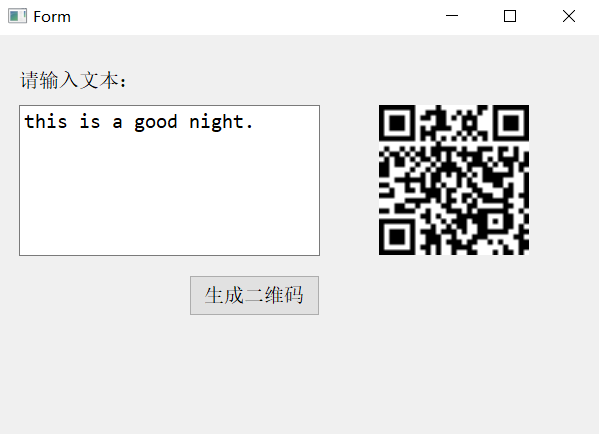
4、结果
来源:
https://www.cnblogs.com/grebamboo/p/12743373.html
声明:本文素材来源网络,版权归原作者所有。如涉及作品版权问题,请与我联系删除。


新闻来源:嵌入式专栏,文中所述为作者独立观点,不代表icspec立场。更多精彩资讯请下载icspec App。如对本稿件有异议,请联系微信客服specltkj。