
页面加载中,请稍候
来源:开源Linux发布时间:2022-11-091323浏览
询问 AI
作者:运维派
Linux 端口的开启
一、firewall 方式 (centOS7.*)
二、修改 iptables 方式 (centOS6.*)
firewall-cmd--state


如果返回的是 “not running”,那么需要先开启防火墙;
systemctlstartfirewalld.service
再次查看防火墙状态,发现已开启!
firewall-cmd--zone=public--add-port=3306/tcp--permanent
显示 success 表示成功
–zone=public 表示作用域为公共的
–add-port=443/tcp 添加 tcp 协议的端口端口号为 443
–permanent 永久生效,如果没有此参数,则只能维持当前 服 务生命周期内,重新启动后失效;
systemctlrestartfirewalld.service
系统没有任何提示表示成功!
firewall-cmd--reload
显示 success 表示成功
#查看已开启的端口
firewall-cmd--list-ports
#关闭指定端口
firewall-cmd--zone=public--remove-port=8080/tcp--permanent
systemctlrestartfirewalld.service
firewall-cmd--reload
#查看端口被哪一个进程占用
netstat-lnpt|grep5672
# centos7默认没有 netstat 命令,需要安装 net-tools 工具:
#安装net-tools
yuminstall-ynet-tools
#临时关闭防火墙
systemctlstopfirewalld.service
#或者
systemctlstopfirewalld
#永久关闭防火墙(必须先临时关闭防火墙,再执行该命令,进行永久关闭)
systemctldisablefirewalld.service
#或者
systemctldisablefirewalld
centOS6.*的linux版本是自带iptables的,所以可以直接使用该方式,centOS7 不自带iptables的,所以要使用该方式,需要手动安装iptables后,再使用该方式!
#修改iptables
[root@localhostsbin]#vi/etc/sysconfig/iptables
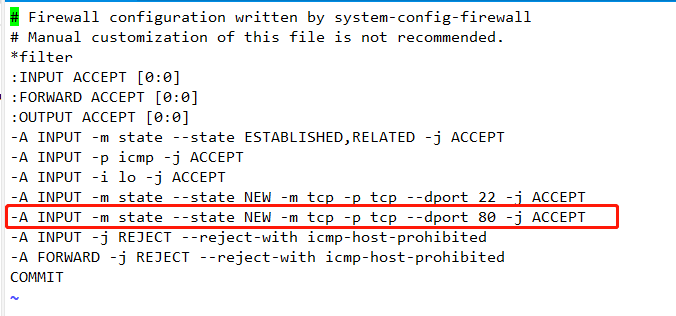
[root@localhostsbin]#/etc/init.d/iptablesrestart

当在 Linux 中成功开启了某个端口,但是远程 telnet 还是无法 ping 通,是正常的!
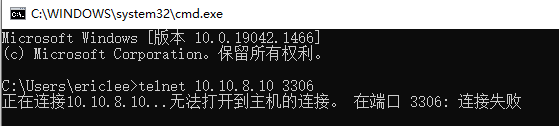
因为 3306 端口没有被 Linux 进程监听,换句话说,就是该端口上没有运行任何程序!!!
新闻来源:开源Linux,文中所述为作者独立观点,不代表icspec立场。更多精彩资讯请下载icspec App。如对本稿件有异议,请联系微信客服specltkj。
暂无评论哦,快来评论一下吧!

2026-06-26

2026-06-03

2026-07-20