
分享几个实用的代码片段(第二弹)
来源:嵌入式大杂烩发布时间:2022-08-151154浏览
询问 AI大家好,我是杂烩君。
本次我们再来分享几个实用的代码小片段。
快速获取结构体成员大小
获取结构体成员大小及偏移量的方式有多种。最简便的方式:
代码:
左右滑动查看全部代码>>>
//微信公众号:嵌入式大杂烩
#include<stdio.h>

//获取结构体成员大小
#defineGET_MEMBER_SIZE(type,member)sizeof(((type*)0)->member)

//获取结构体成员偏移量
#defineGET_MEMBER_OFFSET(type,member)((size_t)((((type*)0)->member)))

typedefstruct_test_struct0
{
charx;
chary;
charz;
}test_struct0;

typedefstruct_test_struct1
{
chara;
charc;
shortb;
intd;
test_struct0e;
}test_struct1;

intmain(intarc,char*argv[])
{
printf("GET_MEMBER_SIZE(test_struct1,a)=%ld\n",GET_MEMBER_SIZE(test_struct1,a));
printf("GET_MEMBER_SIZE(test_struct1,c)=%ld\n",GET_MEMBER_SIZE(test_struct1,c));
printf("GET_MEMBER_SIZE(test_struct1,b)=%ld\n",GET_MEMBER_SIZE(test_struct1,b));
printf("GET_MEMBER_SIZE(test_struct1,d)=%ld\n",GET_MEMBER_SIZE(test_struct1,d));
printf("GET_MEMBER_SIZE(test_struct1,e)=%ld\n",GET_MEMBER_SIZE(test_struct1,e));
printf("test_struct1size=%ld\n",sizeof(test_struct1));

printf("GET_MEMBER_OFFSET(a):%ld\n",GET_MEMBER_OFFSET(test_struct1,a));
printf("GET_MEMBER_OFFSET(c):%ld\n",GET_MEMBER_OFFSET(test_struct1,c));
printf("GET_MEMBER_OFFSET(b):%ld\n",GET_MEMBER_OFFSET(test_struct1,b));
printf("GET_MEMBER_OFFSET(d):%ld\n",GET_MEMBER_OFFSET(test_struct1,d));
printf("GET_MEMBER_OFFSET(e):%ld\n",GET_MEMBER_OFFSET(test_struct1,e));

return0;
}
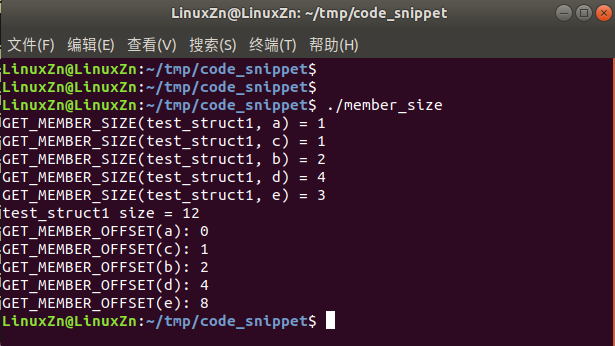
运行结果:
文件操作
文件操作平时用得很多,为了方便使用,可以自己根据实际需要再封装一层:
代码:
左右滑动查看全部代码>>>
//微信公众号:嵌入式大杂烩
#include<stdio.h>

staticintfile_opt_write(constchar*filename,void*ptr,intsize)
{
FILE*fp;
size_tnum;

fp=fopen(filename,"wb");
if(NULL==fp)
{
printf("open%sfileerror!\n",filename);
return-1;
}

num=fwrite(ptr,1,size,fp);
if(num!=size)
{
fclose(fp);
printf("write%sfileerror!\n",filename);
return-1;
}

fclose(fp);

returnnum;
}

staticintfile_opt_read(constchar*filename,void*ptr,intsize)
{
FILE*fp;
size_tnum;

fp=fopen(filename,"rb");
if(NULL==fp)
{
printf("open%sfileerror!\n",filename);
return-1;
}

num=fread(ptr,1,size,fp);
if(num!=size)
{
fclose(fp);
printf("write%sfileerror!\n",filename);

return-1;
}
fclose(fp);

returnnum;
}

typedefstruct_test_struct
{
chara;
charc;
shortb;
intd;
}test_struct;

intmain(intarc,char*argv[])
{
#defineFILE_NAME"./test_file"

test_structwrite_data={0};
write_data.a=1;
write_data.b=2;
write_data.c=3;
write_data.d=4;
printf("write_data.a=%d\n",write_data.a);
printf("write_data.b=%d\n",write_data.b);
printf("write_data.c=%d\n",write_data.c);
printf("write_data.d=%d\n",write_data.d);
file_opt_write(FILE_NAME,(test_struct*)write_data,sizeof(test_struct));

test_structread_data={0};
file_opt_read(FILE_NAME,(test_struct*)read_data,sizeof(test_struct));
printf("read_data.a=%d\n",read_data.a);
printf("read_data.b=%d\n",read_data.b);
printf("read_data.c=%d\n",read_data.c);
printf("read_data.d=%d\n",read_data.d);

return0;
}
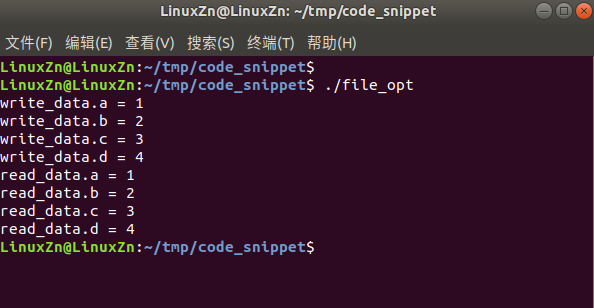
运行结果:
进度条
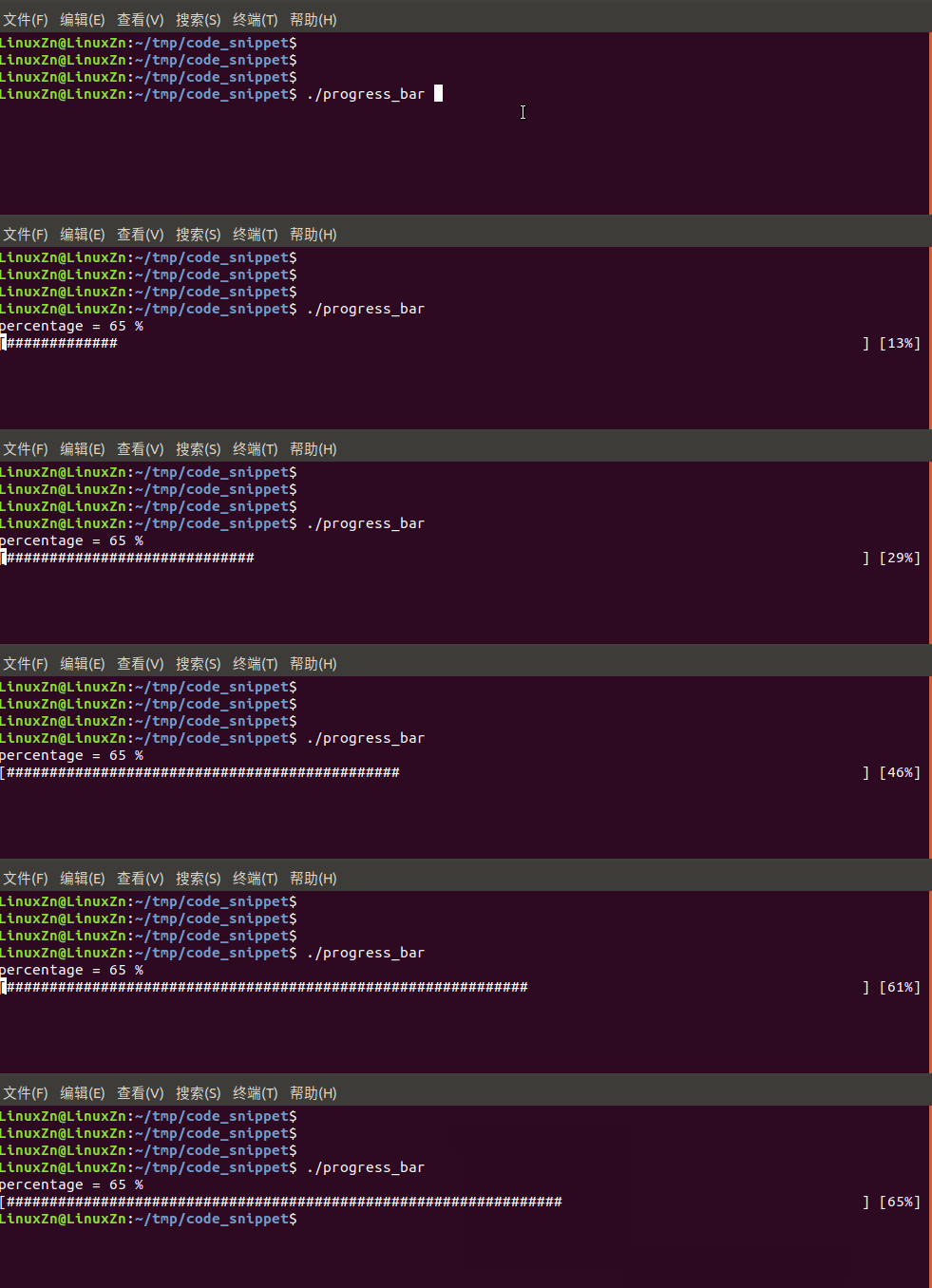
有时候,加上进度条可以比较方便知道当前的下载进度、写入文件的进度等。
代码:
左右滑动查看全部代码>>>
//微信公众号:嵌入式大杂烩
#include<stdio.h>
#include<string.h>
#include<unistd.h>

typedefstruct_progress
{
intcur_size;
intsum_size;
}progress_t;

voidprogress_bar(progress_t*progress_data)
{
intpercentage=0;
intcnt=0;
charproc[102];

memset(proc,'\0',sizeof(proc));

percentage=(int)(progress_data->cur_size*100/progress_data->sum_size);
printf("percentage=%d%%\n",percentage);

if(percentage<=100)
{
while(cnt<=percentage)
{
printf("[%-100s][%d%%]\r",proc,cnt);
fflush(stdout);
proc[cnt]='#';
usleep(100000);
cnt++;
}

}
printf("\n");
}

intmain(intarc,char*argv[])
{
progress_tprogress_test={0};

progress_test.cur_size=65;
progress_test.sum_size=100;
progress_bar(progress_test);

return0;
}
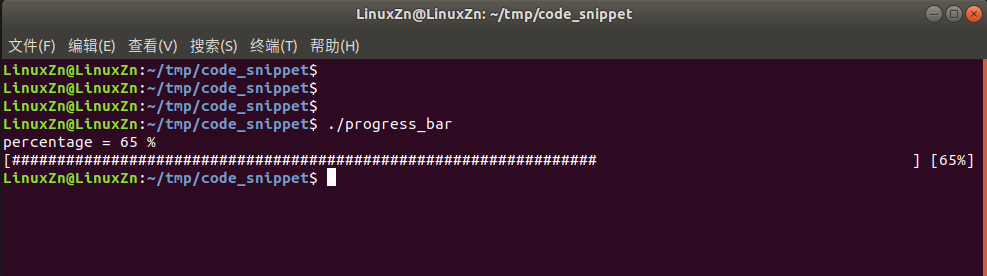
运行结果:
日志输出
日志输出常常需要带一些格式。最简单的方式如:
代码:
左右滑动查看全部代码>>>
//微信公众号:嵌入式大杂烩
#include<stdio.h>

#defineLOG_D(fmt,args...)do\
{\
printf("<<File:%sLine:%dFunction:%s>>",__FILE__,__LINE__,__FUNCTION__);\
printf(fmt,##args);\
}while(0)

intmain(intarc,char*argv[])
{
charch='a';
charstr[10]="ZhengN";
floatfloat_val=10.10;
intnum=88;
doubledouble_val=10.123456;
LOG_D("字符为%c\n",ch);
LOG_D("字符串为%s\n",str);
LOG_D("浮点数为%f\n",float_val);
LOG_D("整数为%d\n",num);
LOG_D("双精度值为%lf\n",double_val);
LOG_D("八进制值为%o\n",num);
LOG_D("十六进制值为%x\n",num);

return0;
}
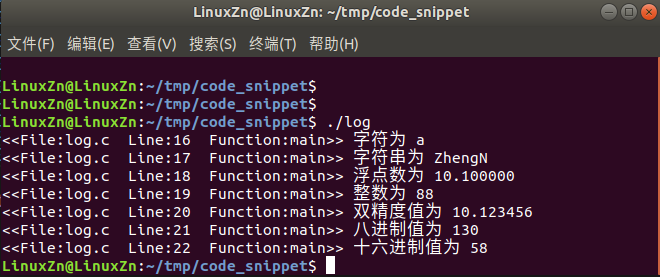
运行结果:
这个是我们上一篇文章分享一种你可能不知道的bug定位方法介绍的,方便大家使用,也汇总在这里。
代码:
左右滑动查看全部代码>>>
//微信公众号:嵌入式大杂烩
#include<stdio.h>
#include<stdlib.h>
#include<sys/time.h>
#include<sys/resource.h>

#defineSHELL_CMD_CONF_CORE_FILE"echo/var/core-%e-%p-%t>/proc/sys/kernel/core_pattern"
#defineSHELL_CMD_DEL_CORE_FILE"rm-f/var/core*"

staticintenable_core_dump(void)
{
intret=-1;
intresource=RLIMIT_CORE;
structrlimitrlim;

rlim.rlim_cur=1?RLIM_INFINITY:0;
rlim.rlim_max=1?RLIM_INFINITY:0;

system(SHELL_CMD_DEL_CORE_FILE);

if(0!=setrlimit(resource,rlim))
{
printf("setrlimiterror!\n");
return-1;
}
else
{
system(SHELL_CMD_CONF_CORE_FILE);
printf("SHELL_CMD_CONF_CORE_FILE\n");
return0;
}

returnret;
}

intmain(intargc,char**argv)
{
enable_core_dump();

printf("==================segmentationfaulttest==================\n");

int*p=NULL;
*p=1234;

return0;
}
以上就是本次分享的几个小的代码片段。
期待你的三连支持!
新闻来源:嵌入式大杂烩,文中所述为作者独立观点,不代表icspec立场。更多精彩资讯请下载icspec App。如对本稿件有异议,请联系微信客服specltkj。